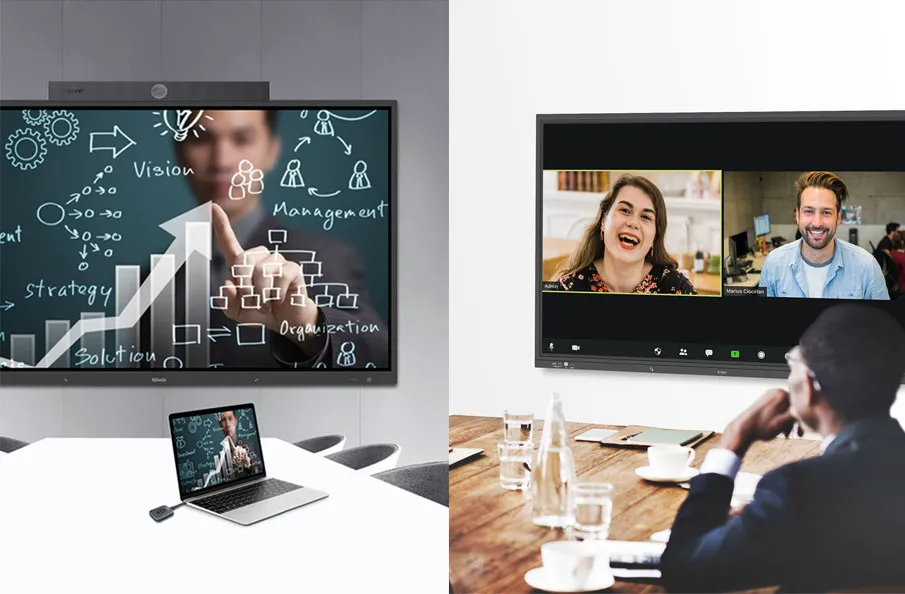
Empower Your Workspace with Smart Conference Room Solutions for Seamless Collaboration and Optimal Efficiency
Introduction
Modern meeting rooms are no longer simple spaces with a display, a conference camera, and a few cables on the table. As hybrid work becomes normal, organizations need meeting spaces that can start quickly, support both in-room and remote participants, and remain easy for IT teams to manage across multiple rooms or locations.
This is where a meeting room control system becomes important. Instead of asking users to operate displays, microphones, cameras, speakers, lighting, source switching, and conferencing tools separately, a control system connects these devices into one simplified room experience.
For businesses, schools, and enterprise facilities, the value is not only convenience. A well-designed conference room control system can reduce meeting delays, lower IT support workload, improve device consistency, and make meeting spaces easier to scale.
In this guide, we explain what a meeting room control system is, how it works, what devices it can manage, how it differs from a meeting room AV system, and how to choose the right control architecture for smart conference rooms.

What Is a Meeting Room Control System?
A meeting room control system is a centralized system that allows users to operate and manage multiple meeting room devices from a single interface. This interface may be a wall-mounted touch panel, tabletop control panel, web console, mobile app, or integrated control dashboard.
In a traditional meeting room, each device often works independently. Users may need one remote for the display, another interface for the video conferencing system, separate controls for audio, manual switching for input sources, and additional controls for lights or curtains. This creates a fragmented experience.
A meeting room control system brings these devices together. With one control interface, users can start a meeting, turn on displays, select an input source, adjust volume, switch cameras, share content, and trigger predefined meeting scenes.
A typical meeting room control system may manage:
- Displays, projectors, and interactive flat panels
- Conference cameras and PTZ cameras
- Microphones, speakers, and audio processors
- Wireless presentation or screen sharing devices
- Presentation switchers and AV source switching
- Lighting, curtains, air conditioning, and other IoT devices
- Room scheduling panels and booking systems
- Centralized management platforms for multi-room deployment
The goal is simple: make the meeting room easier to use for participants and easier to manage for administrators.
Why Meeting Rooms Need Centralized Control
Many organizations upgrade meeting rooms by adding devices over time. A display is added first, then a camera, then a wireless presentation device, then microphones, then a room scheduler, and later a management platform. Each upgrade solves one problem, but the room can become more difficult to operate as the technology stack grows.
Without centralized control, users may face common problems:
- Meetings start late because users cannot connect devices quickly.
- Different rooms have different operating methods, creating inconsistent user experiences.
- Remote participants experience poor audio, video, or content sharing quality.
- IT teams must troubleshoot devices on site instead of managing them remotely.
- Energy is wasted when displays, lights, or AV devices remain on after meetings.
- Meeting rooms are difficult to standardize across multiple offices or campuses.
A conference room control system solves these issues by turning complex device operation into a predictable workflow. Users do not need to understand every device in the room. They only need a simple control interface that matches the way meetings actually happen.
Meeting Room Control System vs. Meeting Room AV System
The terms meeting room control system and meeting room AV system are related, but they are not exactly the same.
A meeting room AV system refers to the audio and visual infrastructure inside the room. This may include displays, cameras, microphones, speakers, video processors, switchers, and wireless presentation tools. Its main purpose is to support communication, content sharing, and conferencing.
A meeting room control system is the layer that makes these AV devices easier to operate and manage. It does not replace AV equipment. Instead, it connects AV devices, IoT devices, and management tools into a unified control experience.
In simple terms:
- The AV system enables people to see, hear, present, and collaborate.
- The control system helps users operate that AV system easily.
- The management platform helps administrators monitor and maintain the room at scale.
A smart meeting room system usually includes all three layers: AV, control, and centralized management.
Key Components of a Conference Room Control System
A conference room control system can vary depending on room size, technology requirements, and deployment scale. However, most modern systems include several core components.
1. Control Interface
The control interface is what users interact with. It may be a touch panel, control keypad, tabletop panel, web interface, or app. A good interface should be simple enough for non-technical users to operate without training.
Common controls include meeting start, display power, input source selection, camera presets, audio volume, mute, lighting scenes, and room mode selection.

2. Control Processor or Central Control Unit
The control processor is the core device that receives commands from the user interface and sends control signals to connected equipment. It acts as the brain of the meeting room control system.
In a Q-NEX smart meeting room, the Networked Presentation Switcher can play an important role in connecting AV control, switching, automation, and centralized management into one platform.
3. AV Source Switching
Modern meeting rooms often support multiple input sources: laptops, wireless presentation systems, media players, cameras, interactive displays, or video conferencing devices. AV source switching allows users to choose which content appears on the display.
For smart conference rooms, source switching should be simple and reliable. Users should not need to reconnect cables or manually adjust multiple devices during a meeting.
4. Audio and Video Device Control
A meeting room control system can manage cameras, microphones, speakers, displays, and other AV equipment. For example, users may switch camera views, adjust audio levels, mute microphones, or turn displays on and off from one interface.
For hybrid collaboration, this is especially important because in-room and remote participants depend on clear audio, stable video, and smooth content sharing.
5. Environmental and IoT Control
Some smart meeting room systems also control lighting, curtains, air conditioning, and other IoT devices. This allows organizations to create preset meeting scenes such as presentation mode, video conference mode, training mode, or energy-saving mode.
Environmental control improves comfort while also reducing manual setup work.
6. Scheduling and Automation
Room scheduling and automation help connect meeting room control with workplace management. For example, a scheduled meeting can trigger devices to prepare automatically before participants arrive. After the meeting, the system can shut down displays, lights, and other equipment to save energy.
This is useful for organizations managing multiple meeting rooms, training rooms, boardrooms, or shared collaboration spaces.
7. Centralized Management Platform
For a single meeting room, local control may be enough. For multiple rooms, centralized management becomes essential. IT teams need to monitor device status, manage settings, troubleshoot issues, and standardize room experiences across locations.
Centralized meeting room management helps organizations move from isolated room control to scalable workplace collaboration infrastructure.

How Meeting Room Control Systems Work
A meeting room control system works by connecting user commands, AV devices, IoT devices, and management software into a coordinated workflow.
A typical meeting workflow may look like this:
- A meeting is scheduled through a booking system or calendar.
- Before the meeting starts, the room prepares selected devices automatically.
- Participants enter the room and use a touch panel to start the meeting.
- Displays, audio devices, cameras, and input sources are activated together.
- Users share content wirelessly or through a connected input source.
- The control system allows easy switching between presentation, conferencing, and discussion modes.
- After the meeting, the system can shut down devices or return the room to standby mode.
The user experience should feel simple, even when the system behind the room is complex.
Benefits of Meeting Room Control Systems
Faster Meeting Startup
One of the most immediate benefits is faster meeting startup. Instead of turning on devices one by one, users can activate the room with one touch. This reduces delays and helps meetings begin on time.
Simpler Room Operation
A centralized control interface removes the need for multiple remotes, cables, and separate device settings. Users can focus on the meeting instead of troubleshooting technology.
Better Hybrid Collaboration
Hybrid meetings require displays, cameras, microphones, speakers, and conferencing tools to work together. A control system helps ensure that these devices operate as a coordinated system, improving the experience for both in-room and remote participants.
Reduced IT Support Workload
When room technology is standardized and centrally managed, IT teams can reduce repetitive support requests. Remote monitoring and centralized control also make it easier to identify device issues before they disrupt meetings.
Consistent Multi-Room Experiences
Organizations with multiple meeting rooms often struggle with inconsistent setups. A standardized control system helps create a similar user experience across huddle rooms, boardrooms, training rooms, and large conference spaces.
Energy and Maintenance Efficiency
Scheduled power control and automation can help turn off displays, lights, and AV devices when rooms are not in use. This reduces energy waste and extends device life.
Control System Requirements by Room Type
Huddle Rooms
Huddle rooms need simple and fast collaboration. The control system should focus on wireless presentation, display control, basic audio and video control, and one-touch meeting startup.
Standard Meeting Rooms
Standard meeting rooms usually need balanced AV control, video conferencing support, source switching, room scheduling, and simple touch panel operation.
Executive Boardrooms
Boardrooms often require more advanced control. This may include multiple displays, premium audio, camera presets, lighting scenes, executive presentation modes, and a more refined control interface.
Training and Presentation Rooms
Training rooms may need dual-screen display, presenter control, recording or streaming support, wireless content sharing, and easy switching between presentation and discussion modes.
Large Conference Rooms
Large conference rooms require more robust AV integration, microphone and speaker coverage, multi-source switching, camera control, and centralized management for reliable operation.
Multi-Room Deployments
For enterprises, campuses, and multi-office organizations, the most important requirement is scalability. The system should support centralized management, remote monitoring, standard room templates, and consistent user interfaces across rooms.
How to Choose the Right Meeting Room Control System
Choosing the right meeting room control system requires more than comparing devices. Organizations should evaluate the full meeting workflow, user experience, IT management needs, and future scalability.
1. Start with the Meeting Scenario
Define how the room will be used. Is it mainly for internal team meetings, hybrid video conferences, executive presentations, training sessions, or multi-room collaboration? The control system should match the actual meeting scenario.
2. Prioritize Ease of Use
The best control system is one that users can operate without thinking about it. Look for a clear interface, simple commands, and predictable room behavior.
3. Check Device Compatibility
A meeting room control system should work with the displays, cameras, microphones, speakers, presentation devices, scheduling panels, and conferencing platforms used in the room.
4. Consider Centralized Management
If your organization manages multiple rooms, centralized management should be a priority. IT teams need visibility into device status, room usage, and system health.
5. Plan for Future Expansion
Meeting room technology changes over time. A scalable system should allow organizations to add new rooms, expand device types, and adapt to future collaboration requirements.
6. Evaluate Total Value, Not Only Initial Cost
A low-cost room setup may become expensive if it creates frequent support issues, inconsistent user experiences, or difficult maintenance. A well-integrated control system can reduce long-term operational costs.
How Q-NEX Supports Smart Meeting Room Control
Q-NEX provides smart meeting room solutions designed to simplify AV control, collaboration, automation, and centralized management. Instead of treating each device as an isolated component, Q-NEX helps organizations build connected meeting spaces that are easier to operate and easier to manage.
A Q-NEX smart meeting room can integrate AV switching, wireless presentation, touch panel control, scheduling, environmental control, and centralized platform management. This creates a more consistent meeting experience while reducing the complexity of multi-device operation.
For users, this means faster meeting startup, simpler room control, and smoother collaboration. For administrators, it means centralized monitoring, remote management, and better scalability across multiple rooms or campuses.
Frequently Asked Questions
What is a meeting room control system?
A meeting room control system is a centralized system that allows users to operate multiple meeting room devices from one interface. It can control displays, cameras, microphones, speakers, source switching, lighting, room scheduling, and other connected devices.
What is the difference between a meeting room control system and a meeting room AV system?
A meeting room AV system includes the audio and visual equipment used for meetings, such as displays, cameras, microphones, speakers, and presentation tools. A control system is the layer that helps users operate and manage those AV devices more easily.
What devices can a conference room control system manage?
A conference room control system can manage displays, projectors, cameras, microphones, speakers, presentation switchers, wireless presentation devices, lighting, curtains, air conditioning, room scheduling panels, and other IoT devices depending on the system design.
Why is centralized control important for smart meeting rooms?
Centralized control reduces operational complexity. It allows users to start meetings faster, control multiple devices from one place, and maintain a consistent experience across different meeting rooms.
Can a meeting room control system support hybrid meetings?
Yes. A meeting room control system can support hybrid meetings by coordinating displays, cameras, microphones, speakers, wireless presentation tools, and conferencing systems so in-room and remote participants can collaborate more effectively.
How does Q-NEX help with meeting room control?
Q-NEX helps organizations integrate AV control, wireless presentation, scheduling, automation, and centralized management into smart meeting room solutions. This simplifies room operation for users and makes multi-room management easier for IT teams.
Conclusion
A meeting room control system is no longer a luxury for modern workplaces. As meeting rooms become more connected, hybrid, and technology-rich, centralized control becomes essential for creating reliable and easy-to-use collaboration spaces.
By connecting AV equipment, room control, automation, scheduling, and centralized management, organizations can reduce meeting friction, improve user experience, and build meeting spaces that are ready for future collaboration needs.
Q-NEX Smart Meeting Room Solution helps organizations simplify meeting room control and create scalable collaboration environments for modern workplaces. To plan your smart meeting room or conference room AV control system, contact Q-NEX for a tailored solution.
Here are some other articles that we think might interest you:
Meeting Room Technology: The Complete Guide to Modern Collaboration
Benefits of Smart Meeting Rooms: Boosting Productivity, Engagement, and Flexibility