


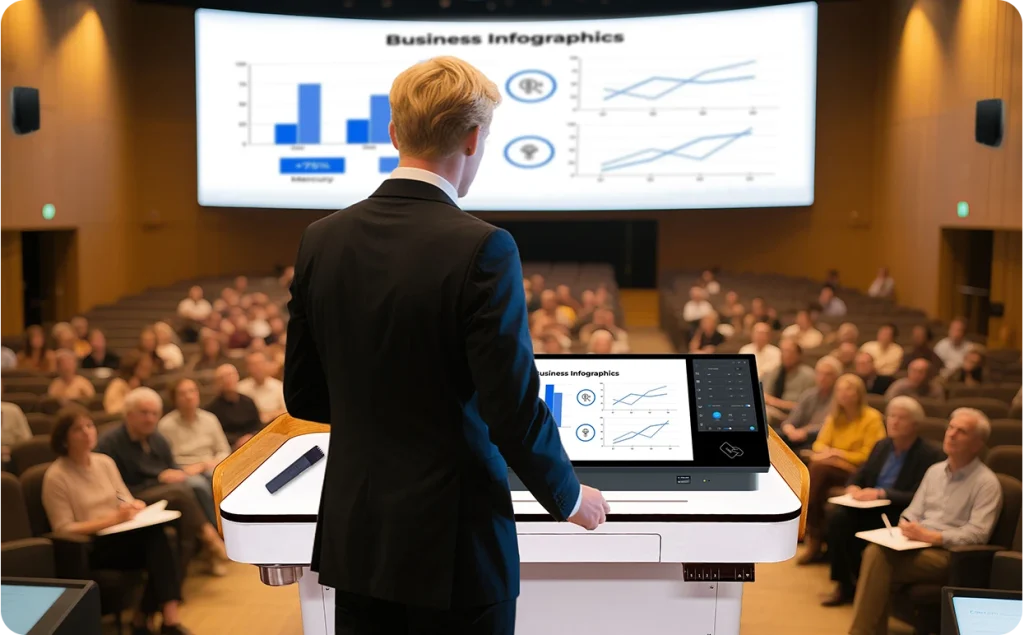


Q-NEX Desktop Digital Podium NDP600, a desktop all-in-one smart podium specifically crafted for classrooms that already possess a lectern. Simply place it on top of the existing lectern, and a conversion to a smart podium is achieved. The smart digital podium can elevate your teaching experience by turning a traditional podium into a smart podium for classroom. Also, it can enhance your presentation capabilities, improve your positioning convenience, and enable flexible content display.
The NDP600 redefines seamless AV performance with its advanced 4×4 HDMI matrix switch, enabling input transitions as fast as a blink. Say goodbye to blackouts and delays—experience smooth, real-time switching for flawless presentations. Whether in meetings, lectures, or live events, ensure a professional, uninterrupted viewing experience every time.
The NDP600’s integrated pen display supports both finger gestures and active stylus writing. Teachers can write, click, zoom, and navigate directly on the screen—just like using a tablet. This intuitive interface keeps focus where it matters: on teaching and engagement.
The display features Optical Bonding for sharper visuals, reduced condensation, and enhanced durability. An Anti-Glare (AG) coating minimizes reflections, while an Anti-Fingerprint (AF) layer helps keep the surface clean and smudge-free—ideal for prolonged classroom use.
Powered by active capacitive technology, the NDP600 allows users to write with the pen while using touch gestures like zooming or navigating with the other hand—without interference. This smooth, dual-input interaction supports fluid teaching and efficient multitasking at the podium.
No more connecting external laptops or cluttering the desk with extra equipment. The NDP600 features a high-performance built-in PC that powers the interactive pen display. It simplifies classroom setup, saves space, and ensures a seamless, ready-to-use experience for every session.
To support easier after-sales service, the NDP600 includes a built-in 1.3-inch (2:1) LED screen that displays firmware version information. This compact screen allows technicians to quickly verify system status and firmware during maintenance checks.
The NDP600 brings everything together for powerful in-room sound. A handheld microphone with charging base connects smoothly through the built-in wireless receiver with dual exposed UHF antennas. An integrated amplifier powers rich, clear audio through the speaker system, delivering effortless voice amplification in any classroom or lecture space.
The integrated audio system delivers high-quality sound with minimal distortion and low latency for uninterrupted audio.
A small, lightweight microphone with a head-worn accessory for free movement and comfort.
Quick and simple connection with infrared pairing technology.
Up to 6 hours of battery life with convenient base charging.
The NDP600 acts as a central controller for all AV and environmental equipment in the classroom. Through its touch panel, teachers can easily operate interactive displays, projectors, screens, document cameras, speakers, microphones, lights, air conditioners, and electric curtains—all from a single interface.
With a single tap, educators can power on or off classroom displays and lighting systems. The ability to activate multiple devices simultaneously simplifies lesson preparation and supports efficient class transitions.
IT staff can remotely manage device power settings across multiple rooms using the Q-NEX Console. Scheduled automation ensures classrooms are prepared before lessons begin—lighting, air conditioning, and displays can all be preset according to school timetables.
Teachers can conveniently mute microphones or adjust speaker volume without leaving the podium. The touch panel serves as a central hub for in-room audio adjustments, reducing the need for separate control tools.
For classrooms using projectors, the NDP600 allows teachers to control both the projector and motorized screen from the touch panel. Even without interactive displays, teachers can write annotations on the digital podium display and project them for the entire class.
Manage temperature, fan speed, and operation modes with precision—right from the podium. The air conditioning interface mirrors the familiar experience of using a remote control while consolidating functions into the centralized system.
After class, the touch panel can be locked to prevent unauthorized use. Faculty members can easily unlock it using an IC card, ensuring both convenience and classroom security.
All control features are mirrored on the Q-NEX Console, accessible via web browser or mobile app. From a single dashboard, IT administrators can monitor device status, execute scheduled tasks, and maintain control across campus—anytime, anywhere.
The NDP600 serves as an AV endpoint capable of receiving scheduled or ad hoc multimedia broadcasts directly from the Q-NEX Console. Whether distributing training videos, announcements, or campus-wide communications, administrators can push content to selected classrooms in real time or schedule it for automatic playback—ensuring timely and uniform message delivery.
The NDP600 can be placed on a traditional lectern and features an adjustable screen angle from 30° to 50°, allowing instructors to comfortably switch between sitting and standing positions. This thoughtful design enhances teaching posture and reduces fatigue during long sessions.
With additional devices such as document cameras or wireless sharing systems access, teachers can present engaging content through multiple screens, enriching the visual experience for students.
The NDP600, with its multifunctionality and easy installation, can be effortlessly deployed in medium to large lecture hall settings. It elegantly delivers presentations and lectures in large venues, enhancing the experience for both presenters and audiences.
The NDP600 control panel allows for easy control of camera images. Through the NDP600, you can access the classroom’s connected cameras, microphones, and other devices, enabling direct online teaching and facilitating hybrid learning.
With its advanced features and adaptability, NDP600 is perfect for meeting rooms, whether online or offline, and can be seamlessly integrated with various devices such as laptops, projectors and sound systems. This facilitates effective communication and collaboration during meetings.
Q-NEX NDP500 smart podium’s dual screens with optical bonding provide a comfortable visual, touch, and writing experience. Teachers can use these screens for annotations and controlling local devices, making presentations more engaging and interactive.
The ability of Q-NEX NDP500 smart podium for classroom can adjust the screen angle from 30° to 50°, which accommodates teaching postures ranging from seated to standing positions, greatly enhancing the comfort and effectiveness of the presenter.
Q-NEX NDP500 smart digital podium 3×2 AV matrix switch function enables flexible switching for displaying different content across multiple screens. It can also facilitate the clear display of identical content across all classroom screens, ensuring that students in every corner can see clearly.
The ability to control the Q-NEX NDP500 smart tech podium both locally and remotely offers significant convenience. Teachers can manage classroom devices (like interactive flat panels, interactive projectors, interactive whiteboard, lights, etc.) from anywhere, anytime, providing ease of use and efficiency in managing the classroom devices and overall learning environment.
Q-NEX NDP500 desktop all-in-one digital podium supports to receive campus-wide AV broadcasting and live streaming, enabling real-time broadcasts or scheduled content delivery to different classrooms. This is ideal for school-wide announcements or sharing educational content across multiple classes.
The Q-NEX NDP500 desktop smart podium can be placed on top of existing lecterns, making it easy to convert traditional podiums into smart podiums without the need for significant changes to classroom layout or infrastructure.
Smart podium is a compact and technologically advanced tabletop presentation device designed for classroom and lecture environments. It integrates multimedia equipment with interaction and device centralized control features, providing an all-in-one solution for presenters.
A desktop smart podium enhances classroom engagement through highly integrated functionality design. It simplifies control of classroom equipment, providing convenience for flexible display of class content. Moreover, placing it on top of existing lecterns can transform them into smart lecterns.
Smart podium works by integrating multimedia equipment like the teacher’s laptop, document camera, passive speaker, air conditioner, light, etc. for centralized control. They enable presenters to better leverage audiovisual devices, share digital content, and engage with the audience.
Smart podium supports connecting various classroom devices, including laptops, interactive flat panels, projectors, interactive whiteboards, air-conditioners, lights, etc. This compatibility allows seamless integration with existing classroom technology and simplifies classroom devices control through simple entry.
Smart podium key features include 4×4 AV matrix switch, device control both locally and remotely, extensive campus-wide AV broadcasting and live streaming capabilities.
Yes. smart podium NDP600 supports laptop connectivity with HDMI/Type-C ports, allowing presenters to share content freely from laptop to display devices in the classroom.
Yes, a smart podium NDP600 can be connected to a variety of devices such as interactive flat panels, projectors, visualizers, microphones, and more, creating an integrated audiovisual environment to simplify teaching operation.
Q-NEX desktop smart podium NDP600 has a unique advantage with its network access feature. This capability facilitates remote control and operation over the Internet, enabling whole-school management. Through scheduled actions, such as powering off devices when classes conclude or broadcasting videos during designated class slots, Q-NEX desktop smart podium NDP600 ensures efficient and tailored utilization in educational environments.
Any questions? We will respond within 24 hours.
See for yourself how to build a Q-NEX smart classroom by the help of our product specialist! Talk to us about your requirements or get your questions answered with a tailored solution.
Please submit your information below and we will be in touch shortly to set up a live demo.