Introduction
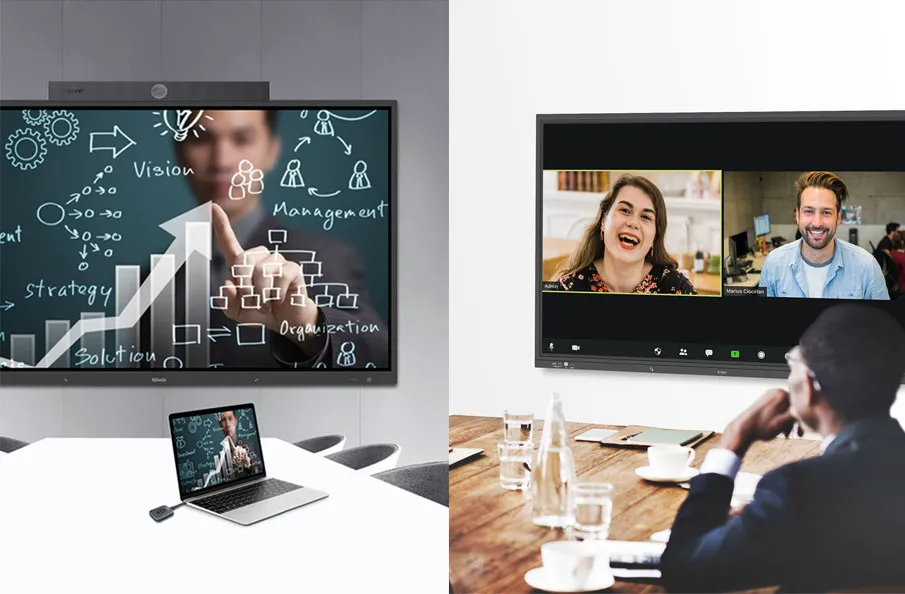
Meeting room technology has become an essential part of modern workplaces as organizations embrace hybrid work, distributed teams, and digital collaboration. Today’s meeting spaces require more than just displays and conferencing devices—they need integrated technologies that enable seamless communication, wireless collaboration, centralized control, and efficient room management.
In this guide, you’ll learn what meeting room technology is, how it works, the essential technologies that power modern collaboration, and how to choose, design, and deploy meeting room solutions for different business environments. Whether you’re upgrading an existing conference room or planning a scalable smart meeting room solution, this guide will help you understand the key technologies and best practices for building future-ready collaboration spaces.
What Is Meeting Room Technology?
Meeting room technology refers to the combination of hardware, software, and integrated systems that enable more efficient communication, collaboration, and management within modern meeting spaces.
Unlike traditional meeting rooms, where displays, conferencing equipment, and control devices operate independently, modern meeting room technology connects these systems into a unified collaboration environment. This integration allows users to share content, join meetings, manage room devices, and collaborate more efficiently through a consistent and intuitive experience.
A typical meeting room technology ecosystem includes audiovisual equipment, video conferencing systems, wireless presentation, room control, scheduling solutions, and centralized management platforms. Rather than functioning as standalone tools, these technologies work together to support productive meetings and simplify workplace operations.
From Traditional Meeting Rooms to Connected Collaboration Spaces
Meeting room technology has evolved significantly alongside changes in workplace collaboration.
Traditional meeting rooms were primarily designed for face-to-face presentations, relying on wired connections, separate audiovisual equipment, and manual device operation. While these setups met the needs of conventional meetings, they often struggled to support today’s hybrid work environments and increasingly digital collaboration.
Modern meeting rooms have shifted from isolated hardware deployments to connected collaboration ecosystems. By integrating communication, control, scheduling, and management technologies, organizations can create meeting environments that are more flexible, scalable, and easier to manage across different rooms and locations.
Traditional vs. Modern Meeting Room Technology
| Traditional Meeting Rooms | Modern Meeting Room Technology |
| Independent devices | Integrated collaboration ecosystem |
| Manual device operation | Centralized control and automation |
| Wired content sharing | Wireless collaboration |
| Limited support for remote participants | Hybrid meeting capabilities |
| Room-by-room management | Centralized monitoring and administration |
| Difficult to scale | Flexible and scalable deployment |
Meeting room technology has evolved from a collection of standalone devices into an integrated collaboration ecosystem. This evolution reflects the changing needs of modern workplaces, where organizations require meeting spaces that are more connected, flexible, and easier to manage than ever before.
As workplace collaboration continues to evolve, organizations face new challenges that traditional meeting room technologies were never designed to address.
Challenges Facing Modern Workplace Collaboration
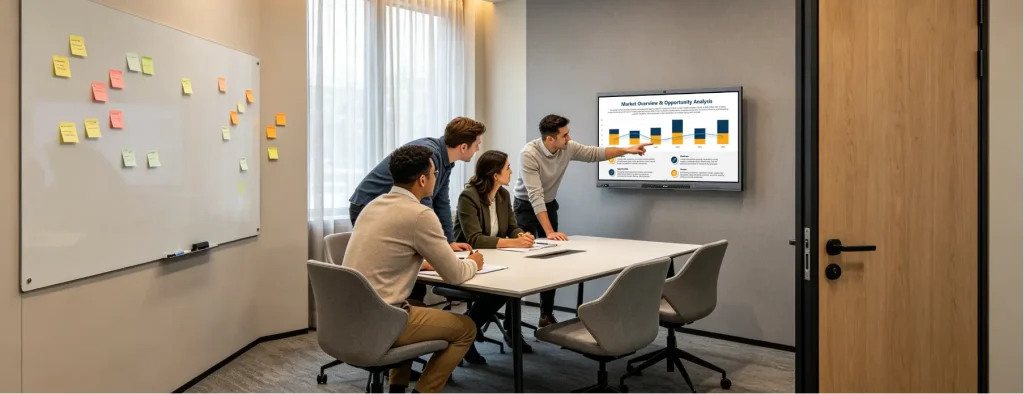
Modern workplaces place greater demands on meeting spaces than ever before. Hybrid work, distributed teams, and digital collaboration require meeting rooms to be more connected, flexible, and easier to manage. However, many organizations still rely on technologies designed for traditional in-person meetings, creating a number of operational and collaboration challenges.
The following challenges are driving organizations to rethink how meeting spaces are designed and managed.
Hybrid Collaboration Challenges
Hybrid meetings have become the norm for many organizations, with participants joining from offices, homes, and different geographic locations. Traditional meeting rooms often fail to provide a consistent experience for everyone, resulting in poor audio quality, limited camera coverage, and ineffective communication between onsite and remote attendees.
Organizations need meeting room technologies that create a more balanced and engaging collaboration experience regardless of where participants are located.
Disconnected Meeting Technologies
Many meeting rooms are built by adding devices over time rather than designing an integrated system. Displays, cameras, microphones, conferencing platforms, and control interfaces often operate independently, creating inconsistent workflows and requiring users to switch between multiple devices during meetings.
A connected technology ecosystem helps eliminate these operational barriers and simplifies the overall meeting experience.
Increasing IT Management Complexity
As organizations expand their meeting spaces across multiple offices or campuses, managing individual devices becomes increasingly difficult. Manual configuration, onsite troubleshooting, inconsistent room setups, and software maintenance consume significant IT resources and increase operational costs.
Centralized management has become essential for maintaining reliable meeting environments at scale.
Inefficient Meeting Room Utilization
Meeting rooms are valuable workplace assets, yet many organizations have limited visibility into how these spaces are actually being used. Double bookings, underutilized rooms, scheduling conflicts, and inefficient space allocation remain common challenges, particularly in larger organizations.
Better scheduling, monitoring, and usage insights are becoming increasingly important for maximizing workplace efficiency.
Evolving Workplace Expectations
Workplace technology continues to evolve as organizations adopt AI-powered collaboration, cloud services, flexible work models, and integrated workplace platforms. Meeting room infrastructure must be able to support these changing requirements without requiring frequent hardware replacements or complete system redesigns.
Organizations are increasingly looking for scalable technology platforms that can adapt to future business needs.
Addressing these challenges requires more than upgrading individual devices. Modern meeting room technology brings together audiovisual systems, wireless collaboration, centralized control, automation, and management into a unified platform that supports today’s collaboration needs while preparing organizations for the future.
Key Components of Modern Meeting Room Technology
Modern meeting room technology is built on the integration of multiple systems rather than a single device. Each component plays a specific role in enabling communication, collaboration, and centralized management. When these technologies work together, they create a meeting environment that is more efficient, scalable, and easier to manage.
The following are the essential building blocks of a modern meeting room.
1. Visual Collaboration Systems
Visual communication is at the heart of every meeting. Whether participants are reviewing presentations, analyzing data, or collaborating remotely, the display system serves as the primary communication interface.
Modern meeting rooms commonly use:
- Large-format commercial displays
- Interactive flat panels
- Dual-display configurations
- Digital whiteboards
- Multi-screen collaboration environments
Compared with traditional projectors, modern displays provide higher image quality, faster startup, better visibility, and support for interactive collaboration.
As organizations increasingly adopt hybrid work, displays are no longer used only for presentations—they have become collaboration hubs that support content sharing, video conferencing, annotation, and real-time teamwork.
2. Audio and Video Conferencing Systems
Clear communication depends on both high-quality audio and reliable video.
Modern meeting rooms integrate multiple AV technologies to ensure that both in-room and remote participants can communicate naturally.
Typical components include:
- Conference cameras
- PTZ cameras
- AI-powered tracking cameras
- Ceiling or tabletop microphone arrays
- Professional conference speakers
- Echo and noise cancellation technologies
Together, these systems improve meeting quality by delivering clearer voice pickup, better participant visibility, and more immersive collaboration experiences.
For hybrid meetings, intelligent camera technologies such as auto-framing and speaker tracking further enhance engagement by automatically focusing on active participants.
3. Wireless Presentation Technology
One of the most noticeable improvements in modern meeting rooms is the shift from cable-based presentations to wireless collaboration.
Instead of connecting HDMI adapters or switching cables between devices, users can present content directly from laptops, tablets, or smartphones with minimal setup.
Wireless presentation technology enables organizations to:
- Start meetings more quickly
- Reduce cable clutter
- Support multiple operating systems
- Encourage more interactive collaboration
- Improve flexibility for guest presenters
Many modern solutions also support multi-user content sharing, allowing multiple participants to present simultaneously and collaborate more effectively.
Related reading: The Difference Between Wireless Screen Sharing, Screen Mirroring and Screen Casting
(Internal link to the existing Q-NEX blog.)
4. Meeting Room Control Systems
As meeting rooms become more technology-rich, managing multiple independent devices can quickly become complicated.
A meeting room control system simplifies operation by providing a single interface for controlling all connected equipment.
Typical control functions include:
- Display control
- Camera control
- Audio management
- Source switching
- Lighting control
- Environmental control
- Meeting scene presets
Instead of operating each device separately, users can perform multiple actions with a single touch, creating a more intuitive and consistent meeting experience.
For IT administrators, centralized control also simplifies device configuration and reduces maintenance complexity across multiple meeting spaces.
5. Room Scheduling and Space Management
Meeting room technology extends beyond what happens during a meeting—it also improves how meeting spaces are planned and utilized.
Modern room scheduling systems help organizations manage meeting spaces more efficiently through:
- Real-time room availability
- Digital room signage
- Calendar synchronization
- QR code check-in
- Occupancy management
- Utilization analytics
These capabilities help reduce scheduling conflicts, improve workspace utilization, and provide valuable insights for workplace planning.
As hybrid work becomes more common, intelligent room scheduling has become an essential part of workplace management.
6. Intelligent Automation and Centralized Management
The most advanced meeting rooms are no longer collections of independent devices—they operate as connected systems.
Automation technologies allow meeting spaces to perform routine tasks automatically, while centralized management platforms provide IT teams with complete visibility across multiple rooms.
Common capabilities include:
- Automatic device startup and shutdown
- Scheduled room operation
- Remote device monitoring
- Firmware updates
- System health monitoring
- Multi-room management
- Energy-saving automation
Rather than requiring administrators to manage each room individually, centralized platforms enable organizations to maintain consistent meeting experiences while significantly reducing operational workload.
This level of integration becomes increasingly important as organizations scale from a few meeting rooms to dozens or even hundreds of collaboration spaces.
Bringing Everything Together
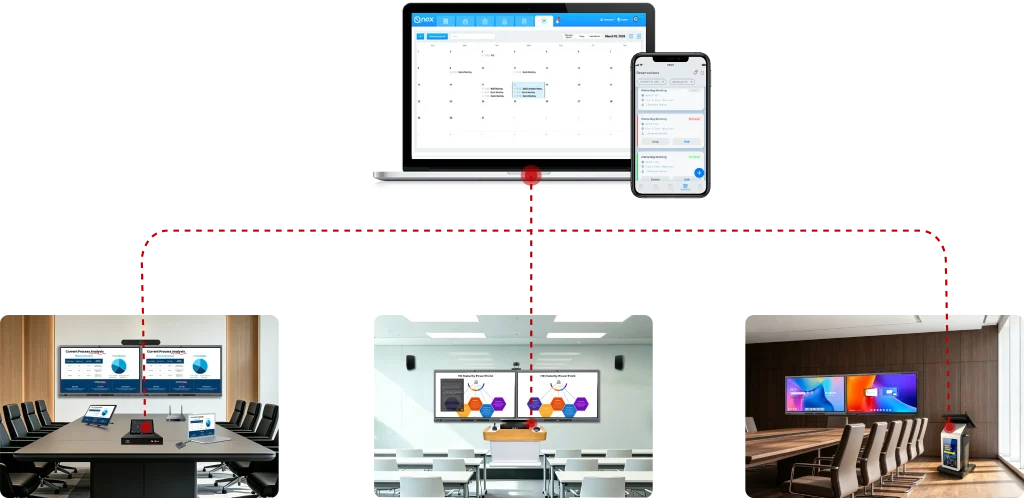
Each technology discussed above delivers value individually, but the real advantage comes from integration.
A modern meeting room is most effective when displays, conferencing systems, wireless presentation, room control, scheduling, and centralized management operate as one connected ecosystem rather than isolated components.
This integrated approach not only improves the meeting experience for users but also simplifies deployment, maintenance, and long-term management for IT teams, creating collaboration spaces that are both easier to use and easier to scale.
How Meeting Room Technology Works
Meeting room technology delivers its greatest value when individual devices no longer operate independently but function as part of an integrated collaboration ecosystem.
Rather than thinking of a meeting room as a collection of displays, cameras, microphones, and control panels, organizations should view it as a connected system where every technology performs a specific role while communicating with the others.
From the moment a user enters the meeting room to the end of the meeting, multiple technologies work together behind the scenes to create a seamless collaboration experience.
From Individual Devices to an Integrated Collaboration Platform
Traditional meeting rooms often consist of standalone devices that require users to manually switch inputs, adjust audio settings, launch conferencing software, and operate different control interfaces.
Modern meeting room technology replaces this fragmented approach with an integrated platform that connects devices, users, and management systems through a unified workflow.
Instead of managing each device individually, organizations can build a meeting environment where displays, cameras, microphones, wireless presentation, room scheduling, and centralized management work together as one coordinated system.
This integrated architecture not only improves the user experience but also simplifies deployment, maintenance, and long-term scalability.
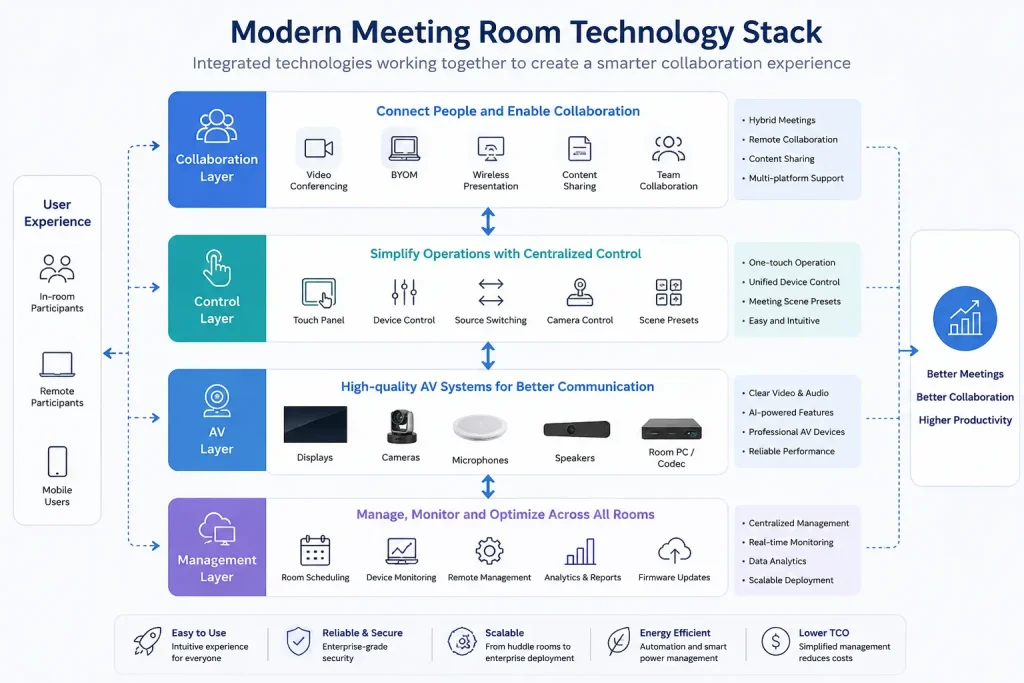
The Five Layers of Modern Meeting Room Technology
Although every meeting room is different, most modern collaboration spaces follow a similar technology architecture.
1. Collaboration Layer
The collaboration layer represents how users communicate and share information during meetings.
Typical technologies include:
- Video conferencing platforms
- Wireless presentation
- BYOM (Bring Your Own Meeting)
- Content sharing
- Interactive collaboration
This layer focuses on creating productive communication between onsite and remote participants.
2. Control Layer
The control layer simplifies meeting room operation by providing a unified interface for managing connected devices.
Typical functions include:
- Touch panel control
- Device switching
- Camera control
- Audio adjustment
- Meeting scene presets
Rather than requiring users to operate multiple independent devices, centralized control creates a consistent meeting experience with fewer steps.
3. AV Layer
The AV layer provides the audio and visual infrastructure that supports communication.
It commonly includes:
- Commercial displays
- Interactive flat panels
- Conference cameras
- Microphone arrays
- Speaker systems
- Video processing equipment
These devices work together to ensure clear communication for both local and remote participants.
4. Management Layer
The management layer provides centralized administration across one or multiple meeting rooms.
Typical capabilities include:
- Room scheduling
- Device monitoring
- Remote management
- Analytics and reporting
- Firmware updates
- System health monitoring
For IT teams, this layer significantly reduces operational workload while improving visibility across collaboration spaces.
5. User Experience Layer
The final layer is the experience users interact with every day.
When all technologies are properly integrated, users experience:
- Faster meeting startup
- Intuitive room operation
- Reliable conferencing
- Seamless content sharing
- Consistent collaboration across different meeting spaces
Instead of focusing on individual technologies, users simply focus on their meetings.
A Typical Meeting Workflow
The following example illustrates how these technologies work together during a typical meeting.
- Participants reserve a meeting room through the scheduling system.
- Room devices automatically prepare for the scheduled meeting.
- Users enter the room and start the meeting using a centralized control interface.
- Wireless presentation allows participants to share content instantly.
- Cameras, microphones, and speakers provide high-quality communication for both local and remote attendees.
- Throughout the meeting, the management platform monitors device status and system performance.
- After the meeting ends, the room automatically powers down unused devices and updates room availability.
Although users experience a simple and intuitive workflow, multiple technologies operate simultaneously behind the scenes to deliver a connected collaboration experience.
Why Integration Matters More Than Individual Devices
Many organizations focus on selecting the best display, camera, or conferencing platform individually.
However, the overall meeting experience depends less on the performance of a single device and more on how effectively different technologies work together.
An integrated meeting room platform offers several long-term advantages:
- Simplified room operation
- Consistent user experience
- Easier IT management
- Greater deployment flexibility
- Improved scalability
- Lower long-term operational costs
As organizations continue expanding hybrid collaboration environments, system integration has become one of the most important factors in building future-ready meeting spaces.
Business Value of Modern Meeting Room Technology
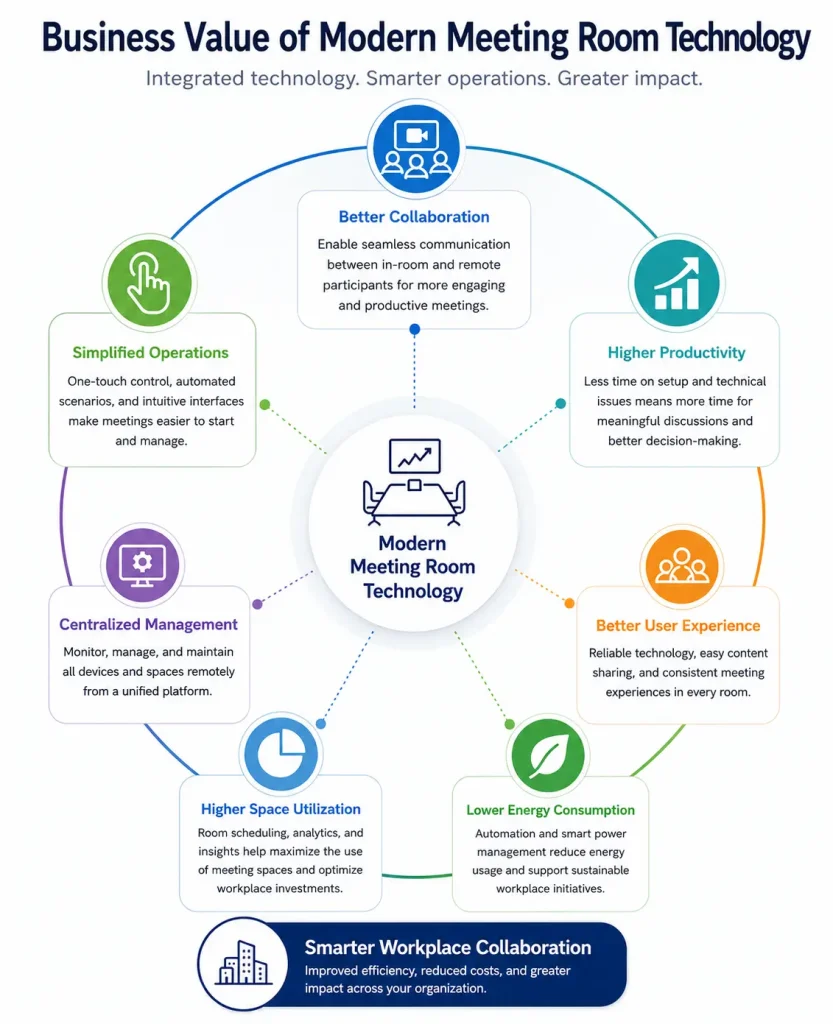
Modern meeting room technology delivers value far beyond better audio and video quality. When integrated into a unified collaboration ecosystem, it helps organizations improve productivity, simplify IT operations, optimize workplace resources, and support long-term business growth.
Increase Workplace Productivity
An intuitive meeting environment allows employees to spend less time dealing with technology and more time collaborating. Features such as wireless presentation, one-touch meeting control, and reliable hybrid conferencing help meetings start faster and run more efficiently, improving overall productivity.
Reduce IT Complexity
Instead of managing individual devices room by room, IT teams can monitor, configure, and maintain meeting spaces through a centralized management platform. This reduces maintenance workload, simplifies troubleshooting, and ensures a consistent user experience across multiple locations.
Optimize Meeting Room Utilization
Integrated scheduling systems and usage analytics provide valuable insights into how meeting spaces are used. Organizations can reduce booking conflicts, improve space allocation, and make more informed decisions about future workplace planning.
Protect Long-Term Technology Investments
A scalable meeting room platform allows organizations to expand from a single room to enterprise-wide deployments without redesigning their infrastructure. Open integration and centralized management also make it easier to adopt new collaboration technologies as business needs evolve.
Why Integration Creates the Greatest Value
The real value of meeting room technology lies not in individual devices, but in how they work together. When displays, conferencing systems, wireless collaboration, room control, scheduling, and centralized management are integrated into one platform, organizations gain a meeting environment that is easier to operate, simpler to maintain, and better prepared for future growth.
How to Choose the Right Meeting Room Technology
Selecting meeting room technology is no longer as simple as purchasing a display and a conference camera. Modern collaboration environments require organizations to consider room size, collaboration styles, user experience, scalability, and long-term management.
Rather than focusing on individual products, organizations should evaluate how different technologies work together to create an efficient, reliable, and easy-to-manage meeting environment.
The following considerations can help guide technology planning for modern meeting spaces.
Define the Purpose of the Meeting Room
Every meeting room serves a different purpose, and technology requirements should reflect how the space will actually be used.
For example:
- Huddle rooms prioritize quick collaboration and wireless content sharing.
- Standard meeting rooms require balanced audiovisual performance for daily team meetings.
- Boardrooms demand premium audio, multiple displays, and seamless executive presentations.
- Training rooms often require interactive displays, recording capabilities, and flexible presentation options.
Understanding the room’s primary function helps determine the appropriate technology investment.
Consider Hybrid Collaboration Requirements
Hybrid meetings have become a standard business practice rather than a temporary trend.
When planning meeting room technology, organizations should ensure that remote participants receive an experience comparable to those attending in person.
Important considerations include:
- High-quality conference cameras
- Professional audio pickup
- Clear room coverage
- Wireless presentation
- Compatibility with major conferencing platforms
- Simple meeting startup
The goal is to eliminate technical barriers so that collaboration feels natural regardless of participant location.
Prioritize Simplicity for End Users
The most advanced meeting room is ineffective if users find it difficult to operate.
Meeting room technology should reduce complexity instead of adding it.
Look for solutions that provide:
- One-touch meeting startup
- Unified device control
- Simple content sharing
- Consistent user interfaces
- Minimal training requirements
An intuitive user experience encourages technology adoption and reduces support requests.
Think Beyond Individual Devices
Many organizations purchase displays, cameras, microphones, and control systems separately.
While each device may perform well individually, disconnected technologies often create inconsistent user experiences and increase management complexity.
Instead, organizations should evaluate whether technologies can operate as a unified ecosystem, where devices communicate, collaborate, and are managed through a centralized platform.
System integration is often more valuable than selecting the highest specification for each individual device.
Plan for Scalability
Meeting room technology should support future business growth.
Whether an organization manages five meeting rooms or five hundred, the technology platform should allow consistent deployment, centralized administration, and easy expansion.
Scalable solutions help organizations:
- Standardize meeting experiences
- Reduce deployment time
- Simplify maintenance
- Add new rooms without redesigning the overall system
Long-term scalability reduces both operational costs and future upgrade complexity.
Choose a Solution with Centralized Management
As organizations expand their collaboration spaces, centralized management becomes increasingly important.
A unified management platform enables IT teams to:
- Monitor room status remotely
- Configure devices centrally
- Schedule maintenance
- Track room utilization
- Perform software and firmware updates
- Troubleshoot devices without onsite visits
Centralized management not only improves operational efficiency but also ensures a consistent experience across every meeting room.
Focus on Long-Term Value Instead of Initial Cost
Selecting meeting room technology should be viewed as a long-term investment rather than a one-time hardware purchase.
While initial equipment costs are important, organizations should also evaluate:
- Ease of deployment
- Ongoing maintenance requirements
- User adoption
- Future expansion capability
- Energy efficiency
- Total cost of ownership (TCO)
Solutions that integrate management, automation, and collaboration capabilities often deliver greater long-term value than purchasing standalone devices from multiple vendors.
Choosing the Right Technology Starts with the Right Architecture
Successful meeting room projects are rarely determined by a single product. They are built on a well-designed technology architecture that connects displays, conferencing systems, wireless collaboration, centralized control, and management into one integrated ecosystem.
Organizations that prioritize integration, scalability, and ease of management are better positioned to create collaboration spaces that remain effective as business needs continue to evolve.
Technology Requirements by Meeting Room Type
Not all meeting rooms serve the same purpose. A small brainstorming space has very different technology requirements from an executive boardroom or a large training room. Instead of deploying identical equipment across every room, organizations should align meeting room technology with how each space is used to maximize collaboration, simplify management, and optimize technology investments.
Huddle Rooms
Huddle rooms are compact collaboration spaces designed for two to six participants. They are ideal for quick discussions, daily stand-ups, and hybrid collaboration where speed, simplicity, and ease of use are the highest priorities.
| Key Requirements | Recommended Technologies |
| Fast meeting startup | Interactive display or commercial display |
| Wireless content sharing | USB conference camera |
| Video conferencing | Speakerphone or microphone array |
| Minimal user training | Wireless presentation system |
| BYOM support |
Best for: Small teams that need fast, cable-free collaboration with minimal setup.
Standard Meeting Rooms
Standard meeting rooms are the most common collaboration spaces in modern workplaces. They support daily team meetings, customer presentations, project discussions, and hybrid collaboration while balancing functionality, cost, and ease of management.
| Key Requirements | Recommended Technologies |
| Reliable audio and video | Large-format display |
| Flexible content sharing | Conference camera |
| Unified room control | Professional microphones and speakers |
| Easy meeting management | Wireless presentation system |
| Meeting room control system | |
| Room scheduling panel |
Best for: Everyday business collaboration and hybrid meetings.
Executive Boardrooms
Boardrooms are designed for executive meetings, strategic planning, and high-level presentations where reliability, professionalism, and premium meeting experiences are essential.
| Key Requirements | Recommended Technologies |
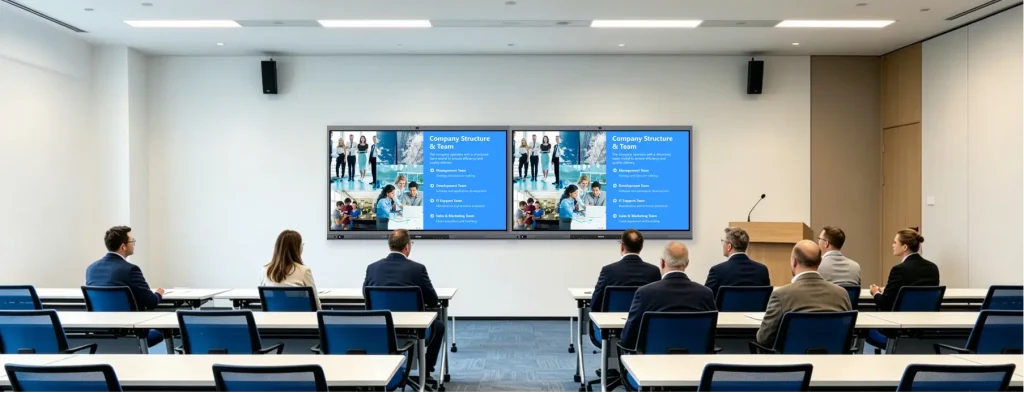
| Premium audiovisual quality | Dual or multiple displays |
| Multiple presentation sources | PTZ conference camera |
| Professional conferencing | Ceiling microphone array |
| One-touch room operation | Professional audio system |
| Centralized room control | |
| Wireless presentation | |
| Intelligent room automation |
Best for: Executive meetings, board discussions, and customer presentations.

Training and Presentation Rooms
Training rooms require greater flexibility to support interactive presentations, workshops, webinars, and employee training. Presenters often need to switch between multiple content sources while engaging both onsite and remote audiences.
| Key Requirements | Recommended Technologies |
| Interactive presentations | Interactive flat panel |
| Flexible content switching | Wireless presentation system |
| Recording or live streaming | Presentation switcher |
| Audience engagement | Professional audio system |
| PTZ camera | |
| Lecture recording or streaming system |
Best for: Corporate training, product demonstrations, webinars, and educational sessions.
Large Conference Rooms
Large conference rooms support meetings involving larger groups and remote participants. These spaces require wider audiovisual coverage, stable conferencing, and centralized control to ensure a consistent collaboration experience.
| Key Requirements | Recommended Technologies |
| Wide camera coverage | Multiple commercial displays |
| Professional audio distribution | PTZ conference cameras |
| Stable hybrid conferencing | Ceiling microphone arrays |
| Centralized room control | Professional DSP audio processing |
| Centralized AV control | |
| Room automation | |
| Unified management platform |
Best for: Large-scale meetings, cross-functional collaboration, and enterprise conferences.
Multi-Room Collaboration Environments
Organizations operating multiple meeting spaces require more than room-level technology. Their priority shifts toward centralized management, standardized deployment, and efficient IT operations across all collaboration spaces.
| Key Requirements | Recommended Technologies |
| Standardized deployment | Centralized management platform |
| Remote monitoring | Meeting room scheduling system |
| Unified scheduling | Remote device management |
| Simplified maintenance | Automation platform |
| Usage analytics | Analytics dashboard |
Best for: Enterprises managing multiple meeting rooms across offices, campuses, or global locations.
Choosing the Right Technology for Every Space
There is no universal meeting room configuration that fits every organization.
The most effective deployments begin with understanding how each meeting space is used, then selecting technologies that support those specific collaboration scenarios.
By matching room types with appropriate technology, organizations can:
- Improve meeting experiences
- Increase technology adoption
- Simplify IT management
- Optimize investment costs
- Build a scalable collaboration infrastructure
A well-planned meeting room strategy focuses not on deploying more devices, but on delivering the right technology in the right space.
How to Build a Smart Meeting Room
Building a smart meeting room involves much more than selecting a display, conference camera, or microphone. The most successful meeting spaces are designed as integrated collaboration environments where every technology works together to deliver a consistent, intuitive, and scalable user experience.
Whether you’re upgrading a single conference room or planning a multi-room deployment across an organization, following a structured approach can help maximize both user satisfaction and long-term return on investment.
Step 1. Define Your Collaboration Goals
Before selecting any equipment, identify how the meeting room will be used.
Consider questions such as:
- Will the room primarily support in-person, hybrid, or remote meetings?
- How many participants will typically use the space?
- Will presentations, training sessions, or video conferencing be the primary activity?
- Is the room intended for executive meetings, daily collaboration, or customer presentations?
Understanding these requirements helps ensure that technology investments align with actual business needs rather than unnecessary hardware specifications.
Step 2. Select the Right Technology Stack
Instead of purchasing individual devices independently, build a complete technology ecosystem.
A typical smart meeting room includes:
| Technology Category | Purpose |
| Commercial Display or Interactive Flat Panel | Visual collaboration and presentations |
| Conference Camera | High-quality video communication |
| Microphone & Speaker System | Clear audio for all participants |
| Wireless Presentation | Cable-free content sharing |
| Meeting Room Control | Unified device operation |
| Room Scheduling | Space management and booking |
| Centralized Management | Remote monitoring and maintenance |
Each component contributes to a connected collaboration experience rather than functioning as an isolated device.
Step 3. Prioritize Integration Over Individual Devices
One of the most common mistakes organizations make is purchasing best-in-class devices that do not work efficiently together.
A truly smart meeting room is built around integration.
Displays, cameras, microphones, wireless presentation systems, room scheduling, and control platforms should operate as a unified ecosystem with a consistent user interface.
This approach simplifies daily operation, reduces support requests, and creates a more reliable meeting experience.
Step 4. Design for Simplicity
The best meeting room technology is often the technology users barely notice.
Meetings should begin quickly without requiring users to:
- Connect multiple cables
- Switch between remote controls
- Configure audio devices
- Troubleshoot compatibility issues
Simple, intuitive workflows encourage user adoption and reduce the need for IT assistance.
Features such as one-touch meeting startup, wireless presentation, and centralized control significantly improve the overall meeting experience.
Step 5. Plan for Centralized Management
As organizations grow, managing meeting rooms individually becomes increasingly inefficient.
A centralized management platform enables administrators to:
- Monitor room status remotely
- Manage multiple meeting rooms from one interface
- Perform firmware updates
- Configure devices remotely
- Monitor system health
- Analyze room utilization
Centralized management reduces operational costs while ensuring consistent performance across all meeting spaces.
Step 6. Build for Future Expansion
Meeting room technology should continue supporting organizational growth long after deployment.
When evaluating a solution, consider whether it can:
- Support additional meeting rooms
- Integrate new collaboration technologies
- Expand across multiple office locations
- Adapt to changing workplace requirements
- Scale without replacing the entire system
A flexible technology architecture protects long-term investments and simplifies future upgrades.
From Individual Devices to an Integrated Meeting Room Solution
Successful meeting rooms are no longer defined by the number of devices installed. Instead, they are measured by how effectively those technologies work together to support collaboration, simplify management, and deliver a consistent user experience.
For organizations planning a modern collaboration environment, an integrated smart meeting room solution combines audiovisual technologies, wireless collaboration, centralized control, room scheduling, and remote management into one unified platform.
Future Trends in Meeting Room Technology
Meeting room technology continues to evolve as organizations embrace AI, hybrid work, and cloud-based collaboration. Rather than adding more standalone devices, businesses are investing in intelligent, connected ecosystems that improve user experiences while simplifying IT management.
The following trends are shaping the future of modern meeting rooms.
AI-Powered Collaboration
Artificial intelligence is making meetings more efficient through features such as intelligent camera framing, speaker tracking, noise cancellation, live transcription, real-time translation, and automated meeting summaries. These capabilities help create more engaging and inclusive hybrid meeting experiences.
Cloud-Based Management
Cloud platforms enable IT teams to remotely monitor devices, deploy updates, manage multiple meeting rooms, and standardize collaboration environments across different office locations. As organizations grow, cloud management will become an essential part of meeting room operations.
Intelligent Automation
Future meeting rooms will automate routine tasks such as powering devices on and off, preparing meeting environments, optimizing audiovisual settings, and adjusting room conditions based on occupancy. Automation reduces manual operation while improving efficiency and user experience.
Open and Scalable Ecosystems
Modern meeting room solutions are increasingly expected to integrate seamlessly with platforms such as Microsoft Teams, Zoom, Google Meet, and enterprise workplace systems. Open, scalable architectures allow organizations to expand collaboration environments while protecting their long-term technology investments.
Looking Ahead
The future of meeting room technology is not about adding more devices—it’s about creating intelligent collaboration ecosystems where AI, automation, centralized management, and open integration work together to deliver more productive, flexible, and scalable meeting experiences.
Frequently Asked Questions
1. What is meeting room technology?
Meeting room technology refers to the combination of audiovisual equipment, collaboration software, control systems, scheduling tools, and management platforms that enable efficient communication and collaboration in modern meeting spaces.
2. What equipment is essential for a modern meeting room?
While requirements vary depending on room size and use, most modern meeting rooms include:
- Commercial display or interactive flat panel
- Conference camera
- Microphone and speaker system
- Wireless presentation system
- Meeting room control system
- Room scheduling solution
- Centralized management platform
Rather than focusing on individual devices, organizations should prioritize technologies that work together as an integrated system.
3. What is the difference between a meeting room and a conference room?
The terms are often used interchangeably, but they typically describe different types of collaboration spaces.
A meeting room usually refers to spaces designed for daily team collaboration, project discussions, and hybrid meetings.
A conference room generally accommodates larger groups, executive meetings, customer presentations, or company-wide discussions, often requiring more advanced audiovisual systems and room control capabilities.
The technology principles discussed in this guide apply to both environments.
4. What makes a meeting room “smart”?
A smart meeting room integrates multiple technologies—including displays, conferencing systems, wireless presentation, room control, automation, and centralized management—into a unified collaboration environment.
The defining characteristic is not the number of devices installed, but how effectively they work together to simplify meetings and improve collaboration.
5. How do I choose the right meeting room technology?
The best solution depends on several factors, including:
- Room size and capacity
- Collaboration scenarios
- Hybrid meeting requirements
- Ease of use
- Integration capabilities
- Centralized management
- Future scalability
Organizations should evaluate complete collaboration ecosystems rather than purchasing individual devices independently.
6. Can meeting room technology be expanded as an organization grows?
Yes. Modern meeting room technology should be designed with scalability in mind.
A centralized platform allows organizations to standardize meeting experiences, remotely manage devices, and expand from individual rooms to enterprise-wide deployments without rebuilding their entire infrastructure.
Conclusion
Meeting room technology has evolved from a collection of independent devices into an integrated ecosystem that supports modern collaboration, simplifies management, and prepares organizations for the future of work.
As hybrid collaboration, AI, and workplace automation continue to reshape business communication, organizations should focus not only on selecting the right equipment but also on building a technology architecture that is scalable, easy to manage, and designed for long-term growth.
Whether you are upgrading a single meeting room or planning a multi-site deployment, a well-designed meeting room technology strategy will improve collaboration, enhance operational efficiency, and maximize the value of your workplace investment.
If you’re ready to move beyond standalone devices and build a fully integrated collaboration environment, explore the Q-NEX Smart Meeting Room Solution to see how centralized control, wireless collaboration, intelligent automation, and unified management can work together in one scalable platform.