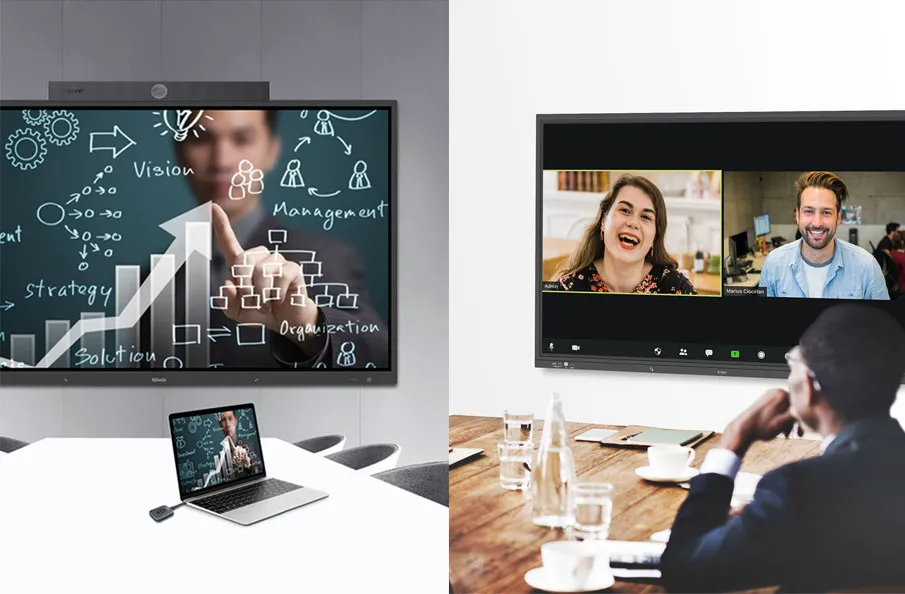
Have you ever found yourself struggling to switch between multiple presentations during a meeting or presentation? Or perhaps you’ve wished for a more convenient way to control your audio and video sources? A presentation switcher is the solution you’ve been looking for.
1. Understanding Networked Switchers
Here we’ll share the definition of a networked switcher and what a networked switchers do.
1.1. What is a Networked Switcher?

A networked switcher is a video switcher that can be controlled remotely over a network. This means you can control it from anywhere in the world, as long as it’s connected to the network. This flexibility is a game-changer for live productions, allowing you to control your switcher from anywhere locally, or even remotely.
1.2. How Does a Networked Switcher Work?
A networked switcher typically connects to a network via Ethernet. It can be controlled using a web browser, dedicated control software, or even a mobile app. Once connected, you can control all the features of the switcher, such as switching between sources, adjusting audio levels, and adding effects.
2. Key Features to Look for in a Networked Presentation Switchers
Here we’ll list several key features for choosing a networked presentation switcher.

2.1. 4K Video Support
With the increasing popularity of high-resolution displays, it’s essential to choose a networked presentation switcher that supports 4K video formats. This ensures that your presentations look sharp and detailed.
2.2. High-Bandwidth Transmission
To deliver high-quality video and audio signals over the network, your switcher needs to support high-bandwidth transmission. This is particularly important for 4K and 8K content, as well as multi-screen setups.
2.3. Multiple Input and Output Ports
A networked presentation switcher should offer a sufficient number of input and output ports to accommodate your specific needs. This allows you to connect multiple devices and distribute signals to various display locations.
2.4. Scalability and Flexibility
A scalable networked presentation switcher can grow with your organization’s needs. It should allow you to add additional input and output devices as required, without compromising performance or requiring major system upgrades.
2.5. Remote Control and Management
A good networked presentation switcher should offer robust remote control and management capabilities. This allows you to control the switcher from anywhere on your network, making it easier to manage and troubleshoot.
2.6. Advanced Audio Features
Many networked presentation switchers offer advanced audio features, such as audio mixing, equalization, and digital signal processing. These features can help improve the overall sound quality of your presentations.
2.7. Security Features
To protect your network and sensitive data, it’s important to choose a networked presentation switcher with strong security features, such as user authentication, encryption, and firewall protection.
3. Benefits of Using a Networked Presentation Switcher
After sharing the key features of a networked presentation switcher, let’s dive deeper into how it can enhance the experience in conference rooms and presentation needs.

3.1. Improved Collaboration
Networked presentation switchers make it easier to collaborate with colleagues and clients, regardless of their physical location. You can share content and control presentations remotely, improving productivity and efficiency.
3.2. Enhanced Presentation Quality
With support for high-resolution video formats and advanced audio features, networked presentation switchers can significantly enhance the quality of your presentations. This helps to create a more engaging and professional experience for your audience.
3.3. Simplified Setup and Management
Networked presentation switchers are typically easier to set up and manage than traditional models. They often come with intuitive software interfaces that allow you to configure and control the switcher remotely.
3.4. Cost-Effective Solution
While the initial cost of a networked presentation switcher may be higher than a traditional model, it can be a cost-effective solution in the long run. By eliminating the need for additional cables and hardware, you can save money on installation and maintenance costs.
4. Key Factors to Consider
Next, we’d like to list several key factors to consider when choosing a networked presentation switcher.

4.1. Input and Output Capabilities
Input Connections: The number of inputs you need will depend on the number of video sources you want to switch between. Common input connections include HDMI, USB, and IP.
Output Connections: The number of outputs you need will depend on the number of displays you want to feed. Common output connections include HDMI, USB, and IP.
4.2. Video Resolution and Format Support
Make sure the switcher supports the video resolutions and formats you need. This is especially important if you’re working with 4K or 8K video.
4.3. Network Connectivity and Protocols
The switcher should support the network protocols you’re using, such as Ethernet and IP. It should also have reliable network connectivity to ensure smooth operation.
4.4. Control and Management Features
A good networked switcher should have a user-friendly interface for control and management. Look for features like remote control, preset recall, and customizable macros.
4.5. Scalability and Expandability
Consider the future needs of your production. Can the switcher be upgraded with additional input and output cards? Can it handle higher resolutions and frame rates?
4.6. BYOM Supportive
The switcher should have BYOM support for the conference room use. Thus creating a flexible online and offline conference environment. In particular, QNEX Networked Presentation Switcher NPS100 supports the BYOM function to seamlessly adopt conference room devices such as PTZ cameras, speakerphones, etc., for online meetings.
4.7. Cost and Budget
Of course, you’ll need to consider your budget. Networked switchers can range in price from a few hundred dollars to tens of thousands of dollars.
5. Key Applications of Networked Presentation Switchers
Networked presentation switchers have found applications in a variety of settings:

5.1. Education and Training Institutions
In educational institutions, networked presentation switchers enable instructors to easily share presentations, videos, and other multimedia content with students. They can also be used for remote learning and online collaboration.
5.2. Corporate Meeting Rooms and Boardrooms
Corporate meeting rooms and boardrooms benefit from networked presentation switchers by providing seamless sharing of presentations, documents, and video conferencing. They can also be used for digital signage and video walls.
5.3. Event and Conference Venues
Event and conference venues often rely on networked presentation switchers to manage multiple presentations and live streams. They can also be used for stage lighting and sound control.
5.4. Broadcast and Media Production Studios
Broadcast and media production studios use networked presentation switchers for live production, editing, and post-production workflows. They can also be used for remote production and distribution.
5.5. Control Rooms and Command Centers
Control rooms and command centers require reliable and efficient AV systems. Networked presentation switchers provide the flexibility and scalability needed to monitor and control various systems and data sources.
6. Future Trends in Networked Presentation Switchers
6.1. Integration with AV-over-IP Solutions
Networked presentation switchers are increasingly being integrated with AV-over-IP solutions, enabling the transmission of audio and video signals over standard IP networks. This further enhances flexibility and scalability.
6.2. AI and Machine Learning Integration
AI and machine learning technologies are being incorporated into networked presentation switchers to automate tasks, improve signal quality, and provide intelligent features like automatic source detection and scene switching.
7. Conclusion
A presentation switcher is an essential tool for anyone who needs to switch between multiple audio and video sources. By understanding the different types of switchers, their features, and how to choose the right one, you can enhance your presentations and improve your workflow. Contact us here to take your networked presentation switcher and enhance your conference experience.
8. FAQs
What is the difference between a networked switcher and a traditional switcher?
A networked switcher can be controlled remotely over a network, while a traditional switcher can only be controlled locally.
Can a networked switcher be controlled remotely?
Yes, a networked switcher can be controlled remotely using a web browser, dedicated control software, or a mobile app.
How many inputs and outputs do I need for my networked switcher?
The number of inputs and outputs you need will depend on the number of video sources you want to switch between and the number of displays you want to feed.
What video resolutions and formats should I look for in a networked switcher?
Make sure the switcher supports the video resolutions and formats you need, especially if you’re working with 4K or 8K video.
What are the common network protocols used in networked switchers?
Common network protocols used in networked switchers include Ethernet and IP.
Here are some other articles that we think might interest you:
Elevate Your Boardroom Meeting with QNEX Networked Presentation Switcher
How to Connect Audio and Video Devices in Conferences?
How Presentation Switchers Upgrade Your Conference Room Experience?