In today’s fast-paced work environment, managing shared spaces like meeting rooms efficiently is essential. Gone are the days of double bookings and room-hunting—modern room scheduling displays bring clarity, control, and productivity. This guide explores key trends and solutions in room scheduling technology, showing how a dedicated display can streamline meetings and transform your office.
1. The Evolution of Meeting Room Scheduling: From Chaos to Clarity
For decades, booking a meeting room was often a low-tech affair. Imagine a paper sign-up sheet outside the door, or perhaps a shared digital calendar that rarely reflected real-time usage. These methods were prone to errors, leading to frequent interruptions, wasted time, and underutilized resources. The need for a more intelligent approach became increasingly apparent as offices evolved.
1.1. Common Challenges with Traditional Booking Methods
Traditional methods for managing a room schedule often faced significant hurdles:
- Double Bookings: Two different teams showing up for the same room at the same time, leading to awkward encounters and delays.
- Lack of Real-Time Information: No easy way to see if a room was actually free or how long it would be occupied without physically checking.
- Inefficient Space Utilization: Some rooms consistently overbooked, while others sat empty due to poor visibility or complicated booking processes.
- Frustration and Wasted Time: Employees spending valuable time trying to locate or confirm meeting spaces instead of focusing on their work.

2. The Role of Room Scheduling in Hybrid Workplace Management
The rise of hybrid workplaces has underscored the critical importance of effective room scheduling. In environments where flexibility is key, and employees seamlessly transition between in-office and remote work, a robust meeting room booking system is no longer a luxury but a necessity.
2.1. Key Features of Modern Room Scheduling Systems
Modern room scheduling systems come packed with features designed to enhance flexibility and efficiency. When looking for a meeting room booking software, consider these essential functionalities:
- Real-time Availability Updates: Displays that show current room status at a glance, instantly updating when a room is booked or becomes free.
- User-Friendly Interfaces: Intuitive touchscreens or web portals that make it easy for anyone to schedule a room with minimal training.
- Mobile Accessibility: The ability to manage bookings, check availability, and even perform check-ins from a smartphone or tablet.
- Automated Notifications: Reminders for upcoming meetings, alerts about room availability changes, or notifications for meeting end times.
2.2. Benefits of Seamless Room Scheduling for Agile Workspaces
Seamless room scheduling profoundly enhances the functionality of agile workspaces by improving space utilization and drastically reducing scheduling conflicts.
Employees can easily reserve meeting rooms without delays, ensuring meetings start on time and valuable work isn’t interrupted. The system promotes collaboration by providing flexible booking options, which reduces downtime between sessions and maximizes the flow of ideas. Moreover, it significantly contributes to employee satisfaction by providing a hassle-free experience for managing workspaces. With optimized scheduling, organizations can ensure their meeting spaces are efficiently used, enhancing productivity and perfectly supporting the dynamic, agile nature of modern work environments. It’s about empowering employees to take control of their collaboration spaces.
3. Understanding the CPL50’s Key Components: A Look at Q-NEX Room Scheduler
While the general principles of room scheduling technology apply broadly, specific products offer unique advantages. Let’s delve into the Q-NEX Room Scheduler CPL50, an innovative solution designed to simplify your office’s meeting room management.

3.1. What Is the Q-NEX Room Scheduler CPL50?
The Q-NEX Room Scheduler CPL50 is a prime example of modern room scheduling technology, built specifically to enhance the way offices manage their meeting spaces. Think of it as a smart assistant for every meeting room door, providing an intuitive, interactive experience.
3.2. Hardware Features of the CPL50
The CPL50 is more than just a screen; it’s a carefully engineered device designed for reliability and ease of use in an office setting.
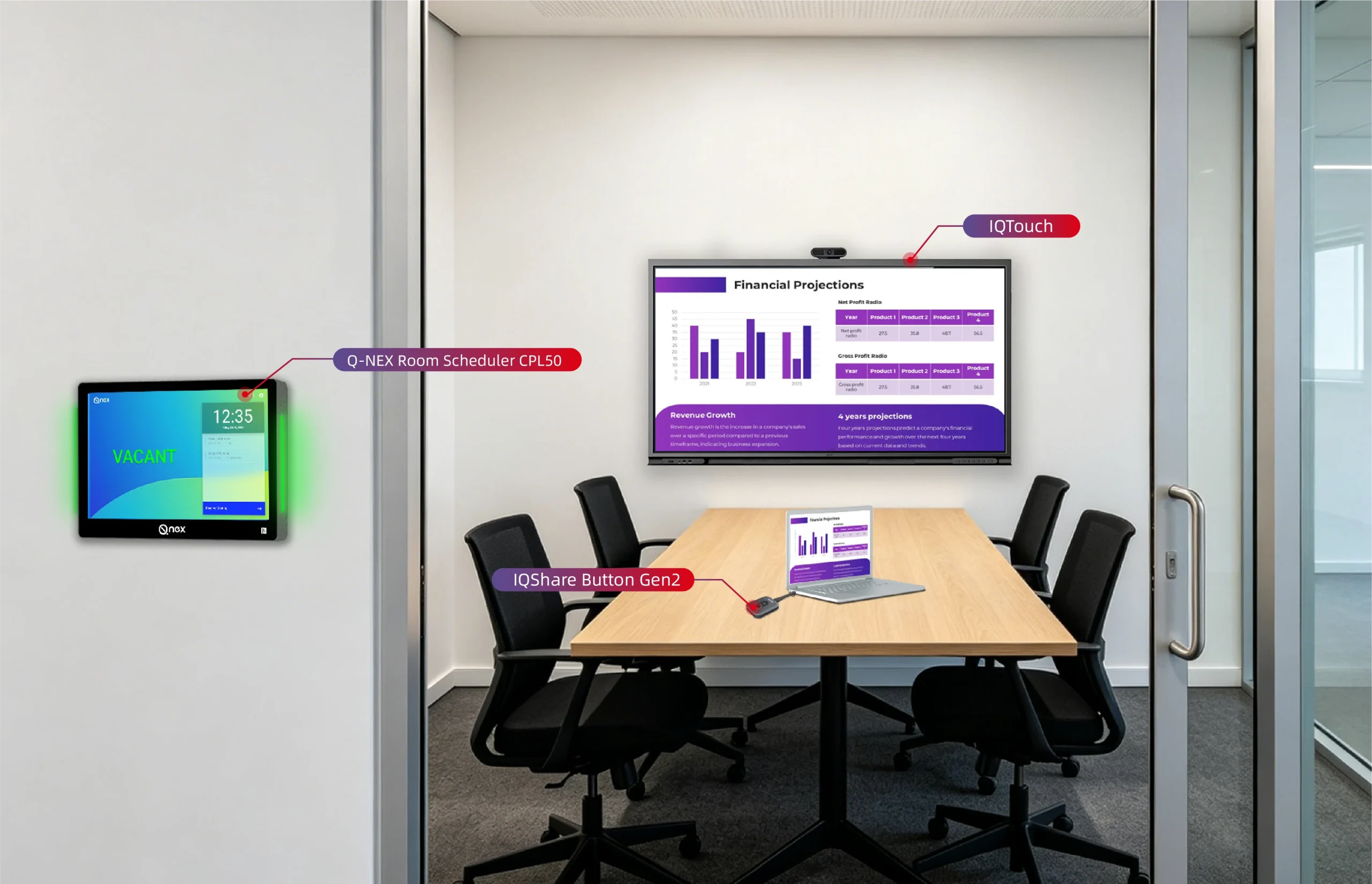
- 10-Inch Touchscreen and LED Status Strip: The 10-inch touchscreen is the primary interface, offering crisp visuals and responsive touch controls. This large size ensures readability from a distance and provides ample space for displaying meeting details, booking options, and general information. Complementing this is the bright LED Status Strip, typically integrated into the device’s side or frame. This visual indicator provides instant availability status (e.g., green for available, red for occupied) from a distance, allowing employees to quickly determine if a room is free without even needing to read the screen. This dual visual approach makes the CPL50 incredibly user-friendly for anyone trying to decipher the current room schedule.
- Lightweight and Aesthetic Design: Beyond functionality, the CPL50 is designed to blend seamlessly into modern office aesthetics. Its sleek, lightweight profile ensures it doesn’t detract from the professional appearance of your meeting spaces. The thoughtful design makes it easy to mount discreetly next to any meeting room door, enhancing both the functionality and visual appeal of your office environment.
3.3. Software Integration with Q-NEX Console
While the hardware is impressive, the real power of the CPL50 comes from its intelligent software integration. The CPL50 is designed to work seamlessly with the Q-NEX Console, which acts as the central management platform. This console allows administrators to manage multiple CPL50 units across different rooms or even different locations.This deep integration is what transforms individual displays into a cohesive, powerful conference room scheduler system, providing comprehensive oversight and control from a single point. This is crucial for managing a complex meeting room schedule.
4. How the CPL50 Room Scheduler Works
Now that we understand the components, let’s dive into the practical aspects of how the CPL50 facilitates smooth room scheduling.
4.1. Core Functionalities for Beginners
For someone just starting with room scheduling technology, the CPL50 simplifies complex processes into intuitive actions.
- Real-Time Room Availability Display: The fundamental function of the CPL50 is to provide a real-time display of room availability. When a meeting is booked through a connected calendar system, the information is instantly pushed to the CPL50 unit outside that specific room. The screen updates to show “Occupied” and displays the current meeting’s details. When the meeting ends, the screen automatically reverts to “Available,” and the status strip turns green. This dynamic updating ensures that the information on the meeting room schedule display is always accurate, preventing frustrating overlaps and allowing for immediate ad-hoc bookings.
- QR Code Check-In Process: The QR Code Check-In is a game-changer for efficiency. When a meeting is scheduled, a unique QR code appears on the CPL50 display before the meeting’s start time. Attendees simply use their smartphone camera to scan this code. This action confirms their presence, officially “claiming” the room. If, for instance, a meeting was booked but no one shows up and checks in within a predefined grace period, the system can automatically release the room, making it available for others to schedule a room. This simple yet powerful feature significantly reduces wasted room time due to no-shows.

4.2. Seamless Integration for Office Use
The CPL50 isn’t just a standalone device; it’s built for seamless integration into the broader office environment.
- Supporting Multi-Location and Time Zone Scheduling: For organizations with multiple offices or a global presence, managing meeting rooms across different locations and time zones can be a nightmare. The CPL50, through its integration with the Q-NEX Console, simplifies this. Administrators can manage the room schedule for rooms across different time zones, ensuring accurate availability displays no matter where the meeting is taking place. This centralized control is vital for large, distributed teams.
5. Applications of the CPL50 Room Scheduler
The versatility of the CPL50 makes it suitable for a wide array of office environments and meeting room types, adapting seamlessly to specific needs.
5.1. Versatility Across Room Types
For organizations with multiple offices or a global presence, managing meeting rooms across different locations and time zones can be a nightmare. The CPL50, through its integration with the Q-NEX Console, simplifies this. Administrators can manage the room schedule for rooms in New York, London, and Singapore all from one central platform, accounting for different time zones and ensuring accurate availability displays no matter where the meeting is taking place. This centralized control is vital for large, distributed teams.
5.2. Benefits for Different Office Sizes
The CPL50 is not exclusive to large corporations. Small and medium-sized businesses (SMBs) can also reap significant benefits. For SMBs, it optimizes the limited meeting spaces they might have, ensuring maximum utilization. For large enterprises, it provides a scalable, enterprise-grade solution for managing hundreds of rooms across multiple buildings, bringing consistency and efficiency to their vast real estate portfolio. This scalability means you can start small and expand your meeting room schedule display system as your needs grow.
6. Getting Started with the CPL50
If you’re considering implementing the CPL50, here’s a beginner’s guide to getting started.
6.1. Choosing the CPL50 for Your Office
The decision to adopt new technology always begins with understanding your specific needs.
- Assessing Needs for Meeting Room Scheduling: Before diving in, take stock of your current challenges. Are you experiencing frequent double bookings? Is it hard for employees to find available rooms? Are some rooms consistently underutilized while others are overbooked? Understanding these pain points will help you articulate exactly how a conference room scheduler like the CPL50 can solve your problems and improve your existing room schedule management.
- Evaluating Budget and Scalability: Consider your budget, both for initial purchase and long-term maintenance. The CPL50 is an investment that yields returns in efficiency. Also, think about scalability: if your office grows or you add more meeting rooms in the future, can the system easily expand to accommodate them? The CPL50’s integration with the Q-NEX Console suggests strong scalability.
6.2. Basic Setup for Beginners
Once you’ve made the decision, setting up the CPL50 is surprisingly straightforward.
- Installing the CPL50 Hardware: The physical installation typically involves mounting the device next to the meeting room door. It’s designed to be lightweight and easy to secure. Powering the device and connecting it to your network (often via Wi-Fi or Ethernet) are the primary steps. Following the provided user manual for specific mounting instructions and network configuration will ensure a smooth setup.

7. Why Choose the CPL50 for Room Scheduling
Beyond its features, there are compelling reasons why the CPL50 stands out as an excellent choice for your office’s room scheduling needs.
7.1. Sustainability and Efficiency Features
Modern businesses are increasingly focused on both operational efficiency and environmental responsibility. The CPL50 addresses both.
- Energy-Saving Sleep Modes: The CPL50’s intelligent energy-saving features, such as automatic sleep modes when rooms are not in use, reduce power consumption. This not only lowers your energy bills but also aligns with corporate sustainability goals, making your office more eco-friendly. This demonstrates a commitment to efficient design beyond just meeting management.
- Optimizing Room Utilization: By providing real-time availability, QR code check-ins, and potentially releasing unconfirmed bookings, the CPL50 actively optimizes the utilization of your meeting spaces. This means fewer wasted resources and more opportunities for teams to schedule a room when they need it, ensuring that every square foot of your office is used to its full potential.
7.2. Future-Ready Technology
Investing in technology means choosing solutions that can evolve with your business.
- Scalability for Growing Offices: The CPL50, particularly with its Q-NEX Console integration, is built for scalability. As your company expands, adds more meeting rooms, or even opens new office locations, the system can easily grow with you. This future-proof design means your initial investment continues to deliver value for years to come without needing a complete overhaul.
8. Conclusion
Understanding room schedule technology—especially solutions like the Q-NEX Room Scheduler CPL50—is key to a more efficient and organized office. With its intuitive 10-inch touchscreen, real-time meeting room schedule display, and QR code check-in, the CPL50 streamlines how you schedule a room, boosts productivity, and supports smart space utilization. Ready to upgrade your office and embrace a more efficient future? Contact us today to learn more and find the right solution for your workspace.
FAQs
What is a room scheduler, and how does the CPL50 enhance meeting room scheduling?
A room scheduler like the CPL50 streamlines meeting room scheduling with a 10-inch touchscreen, QR code check-ins, and real-time meeting room schedule display. It simplifies bookings and reduces conflicts, making it ideal for efficient conference room scheduler tasks.
How does the CPL50’s QR code check-in work for meeting room schedule display?
Users scan a QR code on the CPL50’s touchscreen to confirm attendance, streamlining check-ins. This feature enhances the room scheduler’s usability, ensuring smooth meeting room scheduling and accurate meeting room schedule display.
Can the CPL50 support multi-location room scheduling for global teams?
Yes, the CPL50 supports multi-location room scheduling, syncing with the Q-NEX Console to manage bookings across time zones, making it perfect for global offices needing a reliable conference room scheduler.
How does the CPL50’s LED status strip help schedule a room?
The LED status strip (green for available, red for occupied) provides instant room availability updates, simplifying the process to schedule a room. It enhances the meeting room schedule display for quick decision-making.
Is the CPL50 a sustainable choice for conference room scheduler systems?
Absolutely! The CPL50’s energy-saving sleep modes reduce power consumption, making it a sustainable office scheduling solution. It supports eco-friendly room scheduling while maintaining top performance.
Here are some other articles that we think might interest you:
Step-by-step guide to setting up a room scheduler from scratch