1. Introduction
Conference rooms are the epicenter of collaboration within organizations. Optimizing these spaces goes beyond mere aesthetics; it involves integrating advanced technologies and strategic design to enhance productivity and foster seamless communication. In this guide, we’ll explore key strategies and long-tail solutions to transform your conference room into a hub of efficiency and innovation.
2. Intelligent Room Layout and Design
2.1 Ergonomic Seating Arrangements
Ensure a comfortable and ergonomic seating layout to promote focus and engagement during meetings. Incorporate flexible seating options that cater to various meeting formats, from brainstorming sessions to formal presentations.

2.2 Strategic Lighting Solutions
Implement smart lighting systems that adapt to different meeting scenarios. Use ambient lighting for collaborative discussions and adjustable task lighting for focused work. Consider natural light integration for a refreshing and energizing atmosphere.
2.3 Acoustic Considerations
Address acoustic challenges by integrating sound-absorbing materials and noise-canceling technologies. Create an environment that minimizes distractions and ensures clear communication during virtual or in-person meetings.
3. Advanced Audio-Visual Technologies
3.1 High-Resolution Displays
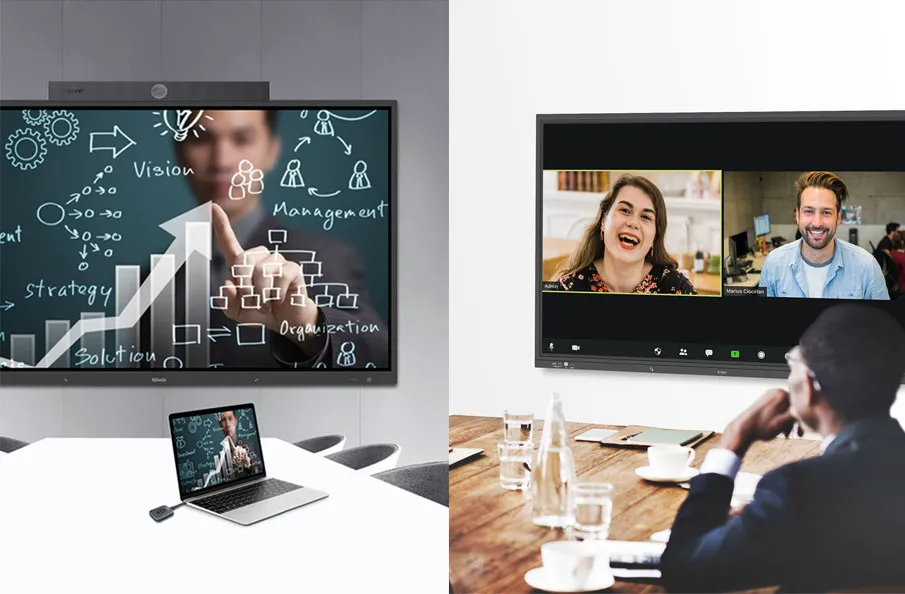
Incorporate high-resolution displays for crystal-clear presentations and video conferencing. Choose interactive displays for dynamic collaboration, allowing participants to annotate and interact with content in real-time.
3.2 Seamless Video Conferencing
Opt for video conferencing solutions that offer high-definition video and clear audio. Implement features like virtual backgrounds, screen sharing, and participant tracking for a smooth and immersive remote collaboration experience.
3.3 Wireless Connectivity
Eliminate cable clutter with wireless connectivity options. Integrate technologies like wireless screen mirroring and casting for a hassle-free connection of devices, enhancing the efficiency of presentations and discussions.
4. Smart Room Control Systems
4.1 Automated Climate Control
Integrate smart climate control systems to ensure a comfortable meeting environment. Automate temperature and ventilation settings based on occupancy, creating an ideal atmosphere for prolonged discussions.
4.2 Intelligent Room Scheduling
Implement room scheduling solutions to streamline meeting bookings. Utilize software that syncs with calendars, displays real-time room availability, and sends notifications, reducing conflicts and improving overall room utilization.
5. Data Security and Privacy Measures
5.1 Secure Wireless Networks
Prioritize data security by establishing secure and encrypted wireless networks. Protect sensitive information shared during meetings and ensure that only authorized individuals have access to the conference room network.
5.2 Privacy Screens and Soundproofing
Enhance confidentiality by installing privacy screens and soundproofing materials. Create a secure environment where discussions remain confidential, and sensitive information is safeguarded from unintended listeners.
6. Continuous Evaluation and Improvement
6.1 User Feedback Mechanisms
Implement user feedback mechanisms to gather insights on the conference room experience. Regularly collect feedback on technology usability, room design, and overall satisfaction to make informed adjustments.
6.2 Technology Upgradation Strategies
Stay ahead of technological advancements by devising a strategy for regular equipment upgrades. Embrace new features and capabilities to ensure that your conference room remains equipped with cutting-edge solutions.
7. Top Presentation Switchers for conferencing occasions
7.1 Q-NEX NPS100
Max. Resolution: 4K@60Hz(4:4:4)
Video Input: 2x HDMI
Video Output: 2x HDMI
USB Ports: 2x USB host, 2x USB device
Features: Networked Presentation Switcher for seamless collaboration, supporting BYOD&BYOM, 4K video, audio, and control signal transmission. Tailored for conference rooms with integration of cameras, speakerphones, and USB devices.

Application: Q-NEX NPS100 is good for SM meeting room occasions. No matter online for remote meeting or offline for presentations and BYOD, NPS is ideal for turing the conferencing area into a smart one easily.
7.2 Extron DTP3 R 301
Max. Resolution: 4K@60Hz(4:4:4)
Video Input: Not specified
Video Output: 1x HDMI
USB Ports: 4x USB 2.0
Features: Long-distance digital twisted pair receiver for extending HDMI, USB 2.0, audio, and bidirectional RS‑232 signals up to 330 feet. Supports video resolutions up to 4K/60 at 4:4:4 color sampling, HDCP 2.3 compliant, with a four-port USB hub and stereo audio de-embedding.
Application: Suited for scenarios where long-distance extension of HDMI, USB data, control, and analog audio (up to 330 feet) is required. Applicable in professional environments with discreet placement needs.
7.3 BZB BG-PS21-4K
Max. Resolution: 4K@60Hz(4:4:4)
Video Input: 1x HDMI
Video Output: 1x HDMI
USB Ports: 1x USB-C, 1x USB host, 2x USB device
Features: Wireless control, HDMI, USB 3.0, LAN, Audio. Supports various control methods including front-panel buttons, USB 3.0, HDMI, RS-232, remote control, RS232, TCP/IP, and a proprietary BG-SWITCH-CONTROL App.
Application: BZB BG-PS21-4K facilitates efficient presentations, video conferences, and multimedia content sharing, providing a flexible and user-friendly solution for diverse business and educational settings.
7.4 Aten VP1420
Max. Resolution: 4K@60Hz(4:4:4)
Video Input: 1x VGA, 3x HDMI
Video Output: 2x HDMI
USB Ports: Not specified
Features: Audio de-embedding/embedding, Analog/Digital AV Matrix. Multi-in-one presentation switcher tailored for various applications from simple source switching to advanced collaboration. User-centric control methods include front-panel pushbuttons, OSD, Web GUI, mobile app, and remote pad, along with IR, RS-232, and Ethernet integration.
Application: Ideal for scenarios requiring seamless collaboration, supporting BYOD&BYOM, 4K video, audio, and control signal transmission in conference rooms. Tailored for integration with cameras, speakerphones, and USB devices.
7.5 AMX Enova DVX All-In-One Presentation Switchers
Max. Resolution: 4K@60Hz(4:4:4)
Video Input: 1x VGA, 3x HDMI
Video Output: 2x HDMI
Features: This multi-in-one presentation switcher is tailored for diverse applications, ranging from simple source switching to advanced collaboration scenarios. Key features include Audio Support, AV Matrix Functionality, Control Methods, Integration Capabilities.
Application: AMX Enova DVX All-In-One Presentation Switchers can be used in various scenarios, offering flexibility and versatility, good for conference rooms occasions.

8. Conclusion
When selecting a solution for our meeting room, it is essential to consider various factors. Actively engaging with contractors, expressing our expectations for the meeting room, and evaluating multiple equipment suppliers by reviewing their feedback enables us to build the most optimal meeting room scenario.
Optimizing your conference room involves a holistic approach, combining ergonomic design, advanced audio-visual technologies, smart room controls, and robust security measures. By continuously evaluating and adapting to evolving needs, you can create a conference room that fosters collaboration, innovation, and seamless communication within your organization.
Embark on the journey to elevate your conference room experience, and witness the positive impact on collaboration and productivity.
Here are some other articles that we think might interest you:
Transform Your Conference Rooms with Q-NEX Networked Presentation Switcher
Symphony of Connectivity: Redefining Presentation Dynamics
Elevate Your Boardroom Meeting with Q-NEX Networked Presentation Switcher