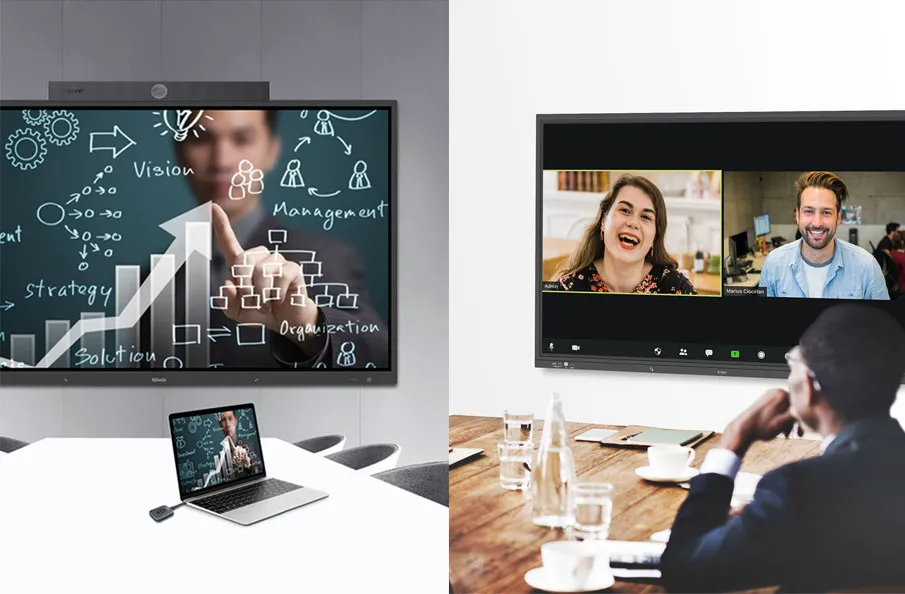
Introduction
Many schools begin their smart classroom journey by purchasing new teaching technologies such as interactive displays, projectors, audio systems, and lecture capture equipment. However, successful smart classroom projects require much more than simply adding devices to a classroom.
A well-designed smart classroom combines teaching technologies, classroom control systems, automation, and centralized management into a connected learning environment that supports both educators and administrators.
Without proper planning, schools often encounter challenges such as fragmented device operation, inconsistent classroom experiences, increased IT workload, and limited scalability.
This guide outlines the key steps involved in planning and implementing a smart classroom, helping educational institutions create learning spaces that are not only digitally equipped, but also easier to manage, more efficient to operate, and ready for future growth.
If you’re still exploring the concept of smart classrooms, start with our comprehensive guide covering smart classroom definitions, technologies, benefits, and future trends before diving into implementation planning.
Why Schools Are Investing in Smart Classrooms
Educational institutions are under increasing pressure to create engaging learning experiences while improving operational efficiency and supporting evolving teaching methods.
Traditional classrooms often rely on standalone technologies that require manual operation and individual management. As schools deploy more digital tools, these fragmented environments become increasingly difficult to maintain and scale.
Smart classrooms address these challenges by connecting classroom technologies through centralized control and management systems. This allows teachers to focus more on instruction, enables IT teams to manage classrooms more efficiently, and helps institutions maximize the value of their technology investments.
Whether the goal is to support hybrid learning, improve classroom management, or modernize campus infrastructure, smart classrooms provide a flexible foundation for the future of education.
Step 1: Define Educational and Operational Goals
Every successful smart classroom project begins with a clear understanding of what the institution wants to achieve.
Many schools start by selecting classroom equipment, but technology decisions should be driven by educational and operational objectives rather than product specifications.
Different institutions often have different priorities. Some aim to improve student engagement through interactive learning tools, while others focus on simplifying classroom management, supporting hybrid learning, or enabling campus-wide technology control.
Before evaluating specific technologies, schools should answer several key questions:
- What teaching challenges are we trying to solve?
- How will classrooms be used on a daily basis?
- Do we need to support hybrid or distance learning?
- How many classrooms will eventually be deployed?
- What level of centralized management is required?
- What are our long-term digital transformation goals?
Clearly defined objectives help ensure that technology investments align with both educational outcomes and operational requirements.
Step 2: Assess Existing Classroom Infrastructure
Before introducing new technologies, institutions should evaluate their current classroom environment.
A thorough assessment helps identify existing resources that can be integrated into the new solution while highlighting areas that may require upgrades.
Key areas to evaluate include:
Display Systems
Review existing projectors, interactive displays, and presentation equipment to determine whether they can be retained or require replacement.
Audio Systems
Assess microphone coverage, speaker placement, audio quality, and classroom acoustics to ensure effective communication throughout the learning space.
Network Infrastructure
Reliable network connectivity is essential for centralized management, automation, AV distribution, and device communication.
Schools should evaluate:
- Network bandwidth
- Wired connectivity
- Wireless coverage
- Switch capacity
- Network security
Environmental Systems
Many institutions overlook lighting, air conditioning, curtains, and power control during planning.
However, these systems often play an important role in classroom automation and energy management.
Management Capabilities
Schools should also evaluate how classroom technologies are currently managed.
Questions to consider include:
- Can devices be monitored remotely?
- How are classrooms maintained?
- How are technical issues reported and resolved?
- Is there a centralized management platform?
Understanding the current environment provides a solid foundation for future planning and helps avoid unnecessary investments.
Step 3: Design the Smart Classroom Architecture
Once goals and infrastructure requirements have been identified, the next step is designing the overall classroom architecture.
This stage is where many institutions mistakenly focus only on hardware selection. However, a successful smart classroom should be planned as a complete ecosystem rather than a collection of independent devices.
A practical smart classroom architecture typically consists of three interconnected layers:
Teaching Layer
The teaching layer includes the technologies used directly during instruction, such as:
- Interactive displays
- Projectors
- Audio systems
- Wireless presentation tools
- Cameras
- Lecture capture systems
These technologies support classroom engagement, collaboration, and content delivery.
Control Layer
The control layer acts as the operational center of the classroom.
This layer enables teachers to control classroom devices through a unified interface and supports automation for routine classroom activities.
Typical components include:
- Classroom control systems
- Touch panels
- Automation engines
- Environmental controls
- Device scheduling systems
Management Layer
The management layer provides centralized visibility and administration across multiple classrooms and learning spaces.
Administrators can monitor device status, manage classrooms remotely, receive alerts, and analyze system performance through a unified platform.
Typical functions include:
- Remote monitoring
- Device management
- Centralized scheduling
- System diagnostics
- Campus-wide administration
By designing these three layers together, schools can create learning environments that are easier to operate, easier to maintain, and easier to scale in the future.
Step 4: Select the Right Classroom Technologies
With the classroom architecture defined, the next step is selecting technologies that support both educational goals and operational requirements.
A common mistake is evaluating classroom technologies individually. While individual devices may perform well on their own, they often create management challenges if they cannot integrate with other systems.
When selecting technologies, schools should prioritize interoperability, scalability, and ease of management rather than focusing solely on hardware specifications.
Interactive Teaching Technologies
Interactive displays and presentation systems remain at the center of most modern classrooms.
These tools enable educators to present multimedia content, annotate lessons, access digital learning resources, and facilitate more engaging classroom interactions.
When evaluating teaching technologies, schools should consider:
- Display size and classroom visibility
- Touch and annotation capabilities
- Wireless presentation support
- Integration with learning platforms
- Long-term usability
Audio and Video Systems
Effective communication is essential for learning.
Audio systems, microphones, cameras, and lecture capture technologies help ensure that content can be delivered clearly and shared beyond the physical classroom when necessary.
For larger classrooms and hybrid learning environments, professional AV solutions often become a critical component of the overall design.
Collaboration Technologies
Modern learning environments increasingly emphasize collaboration rather than one-way instruction.
Wireless presentation systems, content sharing tools, and collaborative learning technologies can help create more interactive learning experiences while supporting flexible teaching methods.
Management-friendly Technologies
When evaluating classroom technologies, schools should also consider how devices will be managed after deployment.
Questions to consider include:
- Can devices be monitored remotely?
- Can software updates be deployed centrally?
- Does the equipment support automation?
- Can it integrate with classroom control systems?
Selecting technologies that support centralized management helps reduce operational complexity and improve long-term sustainability.
Step 5: Implement Centralized Control and Automation
This is the stage where a digital classroom becomes a truly smart classroom.
Many classroom modernization projects focus heavily on purchasing equipment but overlook the importance of device integration and operational efficiency.
Without centralized control, teachers may still need to operate multiple devices independently, resulting in a fragmented user experience.
A classroom control system acts as the operational hub of the learning environment by connecting displays, projectors, audio systems, cameras, lighting, air conditioning, and other technologies into a single platform.
Simplifying Classroom Operations
Through a unified control interface, teachers can perform routine classroom tasks more efficiently, including:
- Powering classroom devices on and off
- Switching presentation sources
- Controlling classroom audio
- Managing recording systems
- Adjusting environmental settings
This simplified workflow reduces technical distractions and allows educators to focus on teaching.
Enabling Classroom Automation
Automation further improves efficiency by reducing repetitive manual tasks.
Examples include:
- Automatic classroom startup before lessons
- Scheduled device shutdown after class
- One-touch teaching scenarios
- Automated environmental adjustments
- Energy-saving schedules
By automating routine operations, schools can improve consistency while reducing administrative workload.
Creating a Consistent User Experience
Standardized classroom controls help create a consistent experience across different learning spaces.
Teachers can move between classrooms without needing to learn different systems, improving technology adoption and reducing training requirements.
Step 6: Enable Campus-wide Management
As smart classroom deployments expand, managing technology at scale becomes increasingly important.
While classroom control improves the experience within individual learning spaces, centralized management helps institutions oversee operations across an entire campus.
This management layer transforms a collection of smart classrooms into a connected smart campus ecosystem.
Centralized Monitoring
Administrators can remotely monitor classroom status, device health, and operational conditions through a unified dashboard.
This visibility helps IT teams identify potential issues before they impact teaching activities.
Remote Maintenance and Troubleshooting
Centralized management platforms enable administrators to:
- Diagnose issues remotely
- Update system configurations
- Manage device settings
- Reduce onsite maintenance visits
This capability becomes particularly valuable for institutions operating large numbers of classrooms.
Data-driven Decision Making
Modern management platforms can provide valuable operational insights, including:
- Classroom utilization
- Device usage trends
- System performance
- Maintenance requirements
These insights help institutions optimize technology investments and improve resource planning.
Preparing for Future Expansion
Educational technology requirements continue to evolve.
A centralized management framework allows schools to expand from individual smart classrooms to lecture halls, collaborative learning spaces, training centers, and campus-wide deployments without fundamentally changing the management architecture.
This scalability helps protect technology investments and supports long-term digital transformation initiatives.
Step 7: Common Mistakes to Avoid When Building a Smart Classroom
Many smart classroom projects encounter challenges not because of the technology itself, but because of planning and implementation decisions made early in the project.
Understanding these common mistakes can help educational institutions avoid unnecessary costs, improve technology adoption, and maximize long-term value.
Mistake 1: Equating More Devices with a Smarter Classroom
One of the most common misconceptions is that adding more technology automatically creates a smart classroom.
Schools may invest in interactive displays, projectors, audio systems, cameras, and other devices without considering how these technologies will work together.
As a result, classrooms become more technologically complex while operational challenges remain unchanged.
Best Practice
Focus on integration rather than equipment quantity.
A smart classroom should be designed as a connected ecosystem where devices, control systems, and management platforms work together seamlessly.
Mistake 2: Ignoring Classroom Management Requirements
Many projects focus heavily on teaching technologies but overlook how classrooms will be managed after deployment.
As the number of connected devices grows, manual maintenance and monitoring become increasingly difficult.
Best Practice
Consider long-term management requirements during the planning stage.
Centralized monitoring, remote management, and automation capabilities should be evaluated alongside teaching technologies.
Mistake 3: Treating Each Classroom as an Independent Project
Planning classrooms individually often leads to inconsistent technology configurations across the campus.
Different user interfaces, device combinations, and operational procedures can create confusion for teachers and increase support requirements for IT teams.
Best Practice
Establish standardized classroom designs and operational workflows whenever possible.
A consistent user experience simplifies training, reduces support requests, and improves technology adoption.
Mistake 4: Underestimating Network Infrastructure
Modern smart classrooms depend heavily on reliable network connectivity.
Insufficient bandwidth, poor wireless coverage, or outdated network equipment can negatively impact classroom performance and management capabilities.
Best Practice
Evaluate network infrastructure as part of the overall smart classroom strategy rather than treating it as a separate project.
Reliable connectivity is essential for automation, centralized management, content sharing, and future expansion.
Mistake 5: Prioritizing Initial Cost Over Long-term Value
Budget considerations are important, but focusing solely on upfront hardware costs can result in higher operational expenses over time.
Solutions that lack centralized management, automation, or scalability often require additional maintenance effort and future reinvestment.
Best Practice
Evaluate total cost of ownership (TCO), including:
- Operational efficiency
- Maintenance requirements
- Energy consumption
- Future scalability
- Lifecycle management
A well-designed solution often delivers greater long-term value than the lowest-cost option.
Mistake 6: Failing to Plan for Future Growth
Educational technology continues to evolve rapidly.
A classroom design that only addresses current requirements may struggle to support future learning models, additional technologies, or campus expansion projects.
Best Practice
Select solutions that are scalable, flexible, and capable of integrating with future technologies.
Planning for growth from the beginning helps protect investments and reduce future deployment costs.
The Most Successful Smart Classrooms Are Built for Long-term Sustainability
Successful smart classroom projects focus on more than equipment procurement.
They consider how technology will be used, managed, maintained, and expanded throughout its lifecycle.
By prioritizing integration, centralized management, automation, and scalability, educational institutions can create learning environments that continue delivering value for years to come.

Conclusion
Building a smart classroom is not simply a technology upgrade—it is a strategic investment in the future of teaching and learning.
While many schools begin by introducing digital teaching tools, the most successful smart classroom projects go beyond individual devices and focus on creating connected, manageable, and scalable learning environments.
- A well-designed smart classroom combines three essential elements:
- Teaching technologies that support engaging learning experiences
- Control systems that simplify classroom operations
- Management platforms that enable campus-wide visibility and administration
By following a structured implementation process—from defining educational goals and assessing infrastructure to deploying centralized control and management systems—schools can maximize the value of their technology investments while creating learning spaces that are ready for future educational needs.
Ultimately, the goal is not to install more technology, but to build learning environments where technology works together seamlessly to support teachers, students, and administrators.
Continue Learning
Building a smart classroom is only one part of a successful digital transformation strategy.
To better understand the technologies, benefits, and evolving role of smart classrooms in modern education, explore our complete guide:
Everything You Need to Know About Smart Classrooms
Frequently Asked Questions
How much does it cost to build a smart classroom?
The cost depends on classroom size, technology requirements, existing infrastructure, and management objectives. A basic smart classroom may include interactive teaching technologies, while more advanced deployments incorporate classroom control systems, automation, lecture capture, and centralized management platforms.
What equipment is needed for a smart classroom?
Typical smart classroom equipment includes interactive displays, projectors, audio systems, cameras, wireless presentation solutions, classroom control systems, and management platforms. The exact configuration should be based on educational goals and classroom requirements rather than a fixed equipment list.
Can existing classroom equipment be reused?
In many cases, yes. Existing displays, projectors, audio systems, and network infrastructure can often be integrated into a smart classroom solution, helping institutions reduce implementation costs and protect previous investments.
What is the most important component of a smart classroom?
While teaching technologies are important, integration is often the most critical factor. A smart classroom becomes truly effective when devices, control systems, and management platforms work together as a unified ecosystem.
How many classrooms can be managed centrally?
Modern classroom management platforms can support anything from a handful of classrooms to hundreds of learning spaces across multiple buildings or campuses, depending on the system architecture.
How long does it take to implement a smart classroom project?
Implementation timelines vary depending on project scope. A single classroom may be completed within days, while campus-wide deployments involving centralized management and automation may require several weeks or months of planning and execution.
What is the difference between classroom control and classroom management?
Classroom control focuses on operating devices within an individual classroom, such as displays, projectors, audio systems, and environmental controls. Classroom management focuses on monitoring, maintaining, and administering multiple classrooms from a centralized platform.
How can schools future-proof their smart classroom investments?
Schools should choose scalable and open solutions that support future technology integration, centralized management, and campus expansion. Planning for long-term growth helps maximize return on investment and reduces future upgrade costs. Understanding the broader benefits of smart classroom technology, including operational efficiency, centralized management, energy savings, and long-term ROI, can help schools make more informed investment decisions.
Planning a smart classroom project? Whether you’re upgrading a single classroom or building a campus-wide learning environment, our team can help you design a solution that aligns with your educational goals, operational requirements, and future growth plans.
Explore Smart Classroom Solution
Talk to Our Education Technology Experts
Here are some other articles that we think might interest you:
The Smart Classroom: How AV Technology is Transforming Education
An Effective Tool to Meet the Needs of Distance Education – Q-NEX Smart Classroom Solution
Enhancing Education: The Power of Smart Classroom Integration