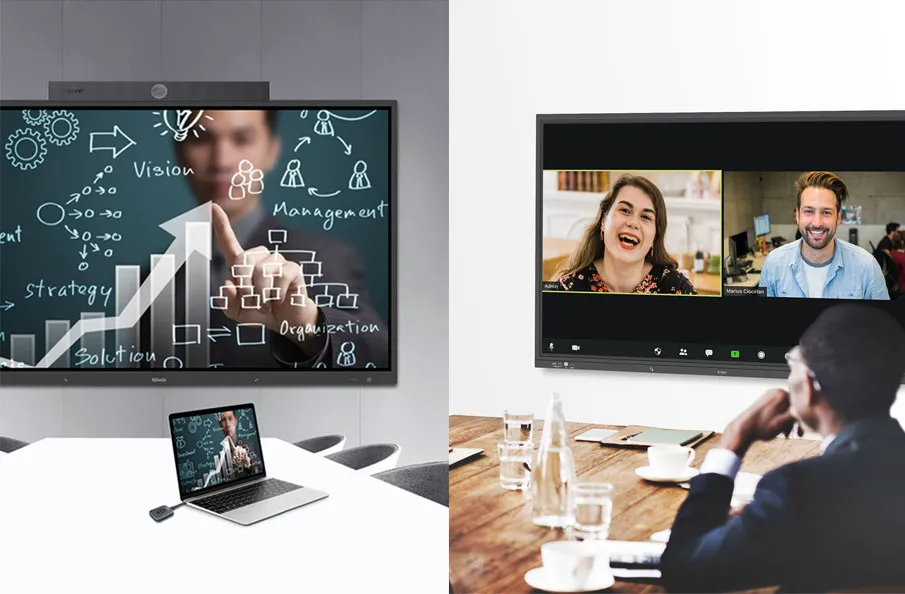
In today’s era of hybrid work environments, managing office resources efficiently is more critical than ever. One of the most essential tools in any smart office strategy is a meeting room booking system. Whether your teams are fully remote, in-office, or constantly shifting between the two, a conference room scheduler streamlines collaboration by ensuring that meeting spaces are available, visible, and easy to reserve. In this comprehensive guide, we’ll explore the best meeting room booking systems , the features that matter most, and how your business can maximize office space usage with the right technology.

1. Why Hybrid Teams Need a Robust Meeting Room Booking System
In hybrid work environments, where teams split their time between in-office and remote work, a robust meeting room booking system is essential for seamless collaboration and efficient office space usage.
1.1. Challenges of Scheduling in Hybrid Work Environments
Hybrid work may offer flexibility and freedom, but it brings unique scheduling headaches. With employees coming into the office on different days, coordinating shared meeting spaces becomes a logistical puzzle.
- Employees may struggle to find available spaces for in-person collaboration.
- Lack of visibility into room usage leads to inefficient hybrid team scheduling.
- Frequent changes in meeting locations result in confusion and wasted time.
Without a centralized room scheduling software, these challenges often snowball into poor meeting experiences and decreased productivity.
1.1.1. Balancing In-Office and Remote Collaboration
Hybrid teams split time between home and office, making hybrid team scheduling a logistical puzzle. Without a meeting room booking system, coordinating in-person meetings while including remote attendees via video conferencing is chaotic. Employees need assurance that rooms are equipped with AV tools for seamless collaboration. A conference room scheduler bridges this gap, ensuring smart meeting room booking aligns with diverse team schedules, fostering equitable participation across hybrid work environments.
1.1.2. Avoiding Double Bookings and Scheduling Conflicts
Nothing derails a meeting faster than a double-booked room. In busy offices, manual scheduling or outdated systems lead to conflicts, wasting time and frustrating teams. A room scheduling software with real-time room availability eliminates these issues, updating room status instantly to prevent overlaps. This ensures office space usage is maximized, allowing hybrid teams to focus on collaboration rather than scrambling for space, a common pain point in hybrid team scheduling.
1.2. Benefits of Streamlined Room Scheduling
Efficient meeting room booking transforms workplace dynamics. By reducing time spent searching for rooms—often up to two hours weekly per employee, per studies—teams gain productivity. A conference room scheduler optimizes space utilization analytics, ensuring rooms are used effectively, not left empty due to “ghost bookings.” This boosts employee satisfaction, supports seamless calendar integration, and creates a collaborative culture where hybrid teams thrive, making smart meeting room booking a cornerstone of modern offices.
2. Key Features to Look for in a Meeting Room Booking System
In hybrid work environments, where teams split their time between in-office and remote work, a robust meeting room booking system is essential for seamless collaboration and efficient office space usage.
2.1. Real-Time Room Availability and Status Displays
A top meeting room booking system must offer real-time room availability. Digital displays outside rooms, showing green for free or red for occupied, provide instant clarity. This prevents conflicts and supports last-minute hybrid team scheduling. Systems with touchscreens or LED indicators ensure employees can schedule a room without guesswork, enhancing office space usage and streamlining conference room scheduler tasks in fast-paced hybrid work environments.

2.2. Support for Multi-Location and Time Zone Coordination
Global hybrid teams need a meeting room booking system that handles multi-location scheduling. A centralized platform syncing rooms across offices and time zones simplifies hybrid team scheduling. For example, a conference room scheduler integrated with Outlook or Google Calendar ensures bookings align with global schedules, supporting seamless calendar integration and maximizing office space usage for distributed teams in hybrid work environments.
3. Top Meeting Room Booking Systems for Hybrid Teams in 2025
Choosing the right meeting room booking system can make or break your hybrid work strategy. In 2025, the best systems go far beyond simple room reservations—they provide data-driven insights, seamless integrations, and intelligent features designed for dynamic and distributed teams.
3.1. Q-NEX Room Scheduler CPL50
The Q-NEX Room Scheduler CPL50 stands out as a leading meeting room booking system tailored for hybrid work environments. With its 10-inch touchscreen, QR code check-in, and sustainable design, it delivers smart meeting room booking and real-time room availability, making it a top conference room scheduler for 2025. Versatile for small meeting rooms, large conference spaces, and training rooms, its robust features optimize office space usage, ensuring hybrid team scheduling is seamless and efficient.
3.1.1. Advanced Touchscreen Interface for Conference Room Scheduler Efficiency
The CPL50’s 10-inch touchscreen simplifies conference room scheduler tasks, displaying meeting details, schedules, and general announcements with clarity. Employees can book rooms for impromptu or future meetings with a few taps, streamlining hybrid team scheduling. The intuitive interface reduces training time, making smart meeting room booking accessible to all, from new hires to executives. By keeping schedules and updates visible, it enhances office space usage in busy hybrid work environments.
3.1.2. QR Code Check-In to Optimize Office Space Usage
QR code check-in is a game-changer for room scheduling software. The CPL50 displays a QR code on its touchscreen, allowing both employees and guests to scan and confirm presence, reducing wait times and no-shows. This feature prevents “ghost bookings,” freeing rooms for others and boosting space utilization analytics. It’s a perfect fit for hybrid work environments, ensuring efficient meeting room booking and supporting hybrid team scheduling with minimal hassle.
3.1.3. Real-Time Room Availability with LED Status Indicators
The CPL50’s LED status strip (green for available, red for occupied) provides instant real-time room availability, eliminating scheduling guesswork. Mounted outside rooms—whether small, large, or training spaces—it ensures employees can schedule a room without interrupting meetings, supporting hybrid team scheduling. This enhances conference room scheduler efficiency, maximizing office space usage in dynamic hybrid work environments.

3.1.4. Space Utilization Analytics via Q-NEX Console
The real power of the CPL50 lies in its integration with the Q-NEX Console, a web-based centralized management platform that aggregates space utilization analytics across all rooms and locations. Administrators can oversee multiple CPL50 units, monitor booking patterns, and manage no-shows, optimizing office space usage. This insight helps facilities teams make data-driven decisions, ensuring multi-location scheduling aligns with hybrid team scheduling needs in hybrid work environments.
3.1.5. Information Display for Clear Meeting Room Schedule
The CPL50’s touchscreen doubles as an information hub, displaying upcoming schedules and general announcements. This clear meeting room schedule keeps teams informed, reducing confusion in hybrid team scheduling. By providing a centralized conference room scheduler view, it ensures smart meeting room booking is transparent and efficient, enhancing office space usage without relying on external calendar tools.
3.1.6. Energy-Saving Design for Eco-Friendly Scheduling
Sustainability is a priority, and the CPL50’s sleep mode reduces power consumption when rooms are unused, promoting eco-friendly scheduling. Its sleek, lightweight design blends into any office, from small meeting rooms to training spaces, combining aesthetics with functionality. This makes the CPL50 a responsible choice for room scheduling software, aligning with corporate sustainability goals in hybrid work environments while optimizing office space usage.
4. How to Choose the Right Conference Room Scheduler for Your Office
Selecting the ideal conference room scheduler is essential for creating an efficient, collaborative, and flexible hybrid workplace. With so many options available, the best choice depends on your team’s specific needs, office layout, and the complexity of your room scheduling software ecosystem.
4.1. Assessing Your Organization’s Needs
Choosing a conference room scheduler starts with understanding your office’s needs. Assess room types (huddle rooms, conference spaces) and equipment (AV, accessibility). Consider team size and hybrid patterns—do employees need mobile access or multi-location support? A meeting room booking system like the CPL50, with its scalable Q-NEX Console, caters to diverse needs, ensuring hybrid team scheduling and smart meeting room booking align with your goals.
4.2. Comparing Costs and Support Options
Budget matters when selecting room scheduling software. Free trials or basic plans offer a starting point, but premium features like space utilization analytics or seamless calendar integration often justify costs. Evaluate support—does the provider offer onboarding or responsive help? The CPL50’s Q-NEX Console includes robust support, ensuring smooth implementation for hybrid work environments, balancing cost with long-term office space usage benefits.
5. Implementing a Meeting Room Booking System Successfully
Rolling out a meeting room booking system across your hybrid office can be a game-changer—but success depends on more than just choosing the right software. Implementation must be strategic, inclusive, and aligned with your team’s workflows. The goal is simple: make conference room scheduler adoption smooth, maximize office space usage, and promote consistent, long-term engagement.
5.1. Best Practices for Rollout
A successful meeting room booking system rollout requires planning. Start with a pilot program to test features like QR code check-in or real-time room availability. Train employees on seamless calendar integration with Outlook/Google, using quick guides for tools like the CPL50’s touchscreen. Set clear booking policies (e.g., no-show timeouts) to prevent misuse, ensuring hybrid team scheduling and smart meeting room booking adoption in hybrid work environments.

5.2. Measuring Success
Post-implementation, track space utilization analytics to gauge the conference room scheduler’s impact. Monitor booking frequency, no-show rates, and employee feedback to identify improvements. The CPL50’s Q-NEX Console provides data to refine room scheduling software, ensuring office space usage is optimized. Regular check-ins keep the meeting room booking system aligned with evolving hybrid work environments, supporting hybrid team scheduling.
6. Future Trends in Room Scheduling Software for Hybrid Work
As hybrid work continues to evolve, so too must the technology that supports it—especially room scheduling software.
6.1. AI and Automation in Meeting Room Management
AI is reshaping room scheduling software. Predictive algorithms suggest optimal booking times based on team patterns, enhancing smart meeting room booking. Automated cleaning schedules or maintenance alerts, integrated with conference room scheduler systems, ensure rooms are ready, supporting real-time room availability.
6.2. Evolving Hybrid Work Needs
As hybrid work evolves, meeting room booking systems will integrate advanced video conferencing tools for seamless remote collaboration. Features like wellness-focused scheduling (e.g., air quality monitoring) and eco-friendly scheduling will gain traction. The CPL50’s sustainable design positions it well for these trends, ensuring office space usage and space utilization analytics meet future demands in hybrid work environments.
7. Conclusion
Finding the best meeting room booking system for hybrid work environments is key to productive collaboration. With real-time room availability, robust management features, and space utilization analytics, a conference room scheduler like the Q-NEX Room Scheduler CPL50 transforms room scheduling software. Its touchscreen, QR code check-in, and eco-friendly scheduling optimize office space usage for hybrid team scheduling. Ready to streamline your smart meeting room booking? Contact us to explore the CPL50 and elevate your hybrid workplace in 2025.
FAQs
What makes the CPL50 the best meeting room booking system for hybrid teams?
The CPL50’s touchscreen, QR code check-in, and Q-NEX Console deliver real-time room availability and space utilization analytics, optimizing hybrid team scheduling in hybrid work environments.
How does real-time room availability help in hybrid work environments?
Real-time room availability prevents double bookings, ensuring office space usage is maximized for hybrid team scheduling with a conference room scheduler like the CPL50.
Can a room scheduler support different time zones?
Yes, the CPL50’s Q-NEX Console supports multi-location scheduling, managing rooms across time zones for accurate conference room scheduler bookings in global hybrid work environments.
What are the benefits of space utilization analytics in a meeting room booking system?
Space utilization analytics track room usage, helping optimize office space usage and hybrid team scheduling with data-driven room scheduling software.
Does the CPL50 support eco-friendly scheduling in room scheduling software?
The CPL50’s sleep mode promotes eco-friendly scheduling, reducing energy use while enhancing smart meeting room booking in hybrid work environments.
Here are some other articles that we think might interest you:
Step-by-step guide to setting up a room scheduler from scratch
Simple Beginner Guide to Understanding Room Scheduling Technology